For Specific Date
Use For Specific Date to load appointment availability for a selected date.
The screen displays available locations, appointment times, and visit options for the selected doctor and appointment date.
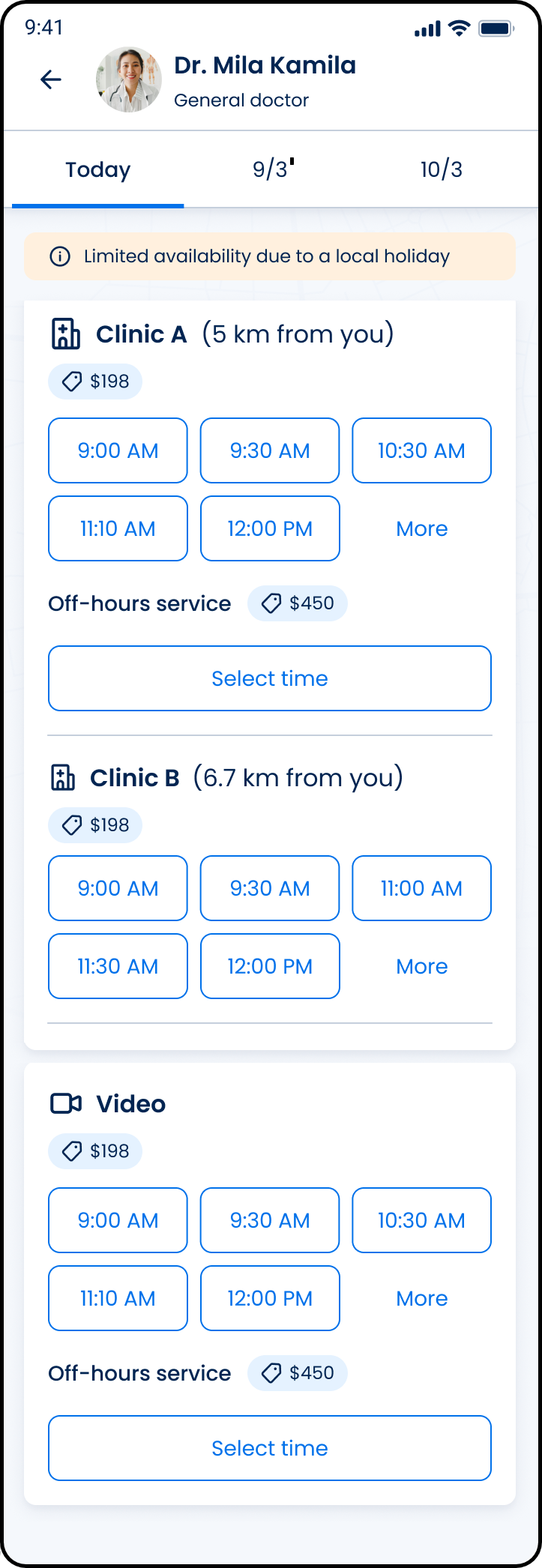
This screen includes:
| # | Element | Description |
|---|---|---|
| 1 | Header | Displays doctor image, name, specialty, and back navigation |
| 2 | Date selector | Displays available appointment dates |
| 3 | Availability notice | Displays scheduling notices, such as limited availability due to local holidays |
| 4 | Location card | Displays appointment location or visit type |
| 5 | Distance indicator | Displays the distance from the patient for applicable locations |
| 6 | Fee indicator | Displays the appointment fee |
| 7 | Time slot list | Displays available appointment times |
| 8 | More action | Loads additional appointment times |
| 9 | Off-hours service section | Displays off-hours appointment availability and fee |
| 10 | Select time action | Opens the off-hours appointment request flow |
| 11 | Location separator | Separates multiple appointment locations |
Workflow
- Select a location.
- Display available time slots.
- Select More when additional availability exists.
- Load additional time slots.
Validations
| Scenario | App Behavior | SDK Output |
|---|---|---|
| Additional slots available | Display More action | slots = expandable |
| Additional slots unavailable | Hide More action | slots = complete |
| Slot unavailable | Disable selection | slot = unavailable |
Actions
| Scenario | App Behavior | SDK Output |
|---|---|---|
| More selected | Load additional time slots | PATCH /api/v3/wizard/time-location-selection/time-slots/more |
| Slot selected | Update appointment selection | slot = selected |
Endpoint Resources
For Specific Date
PUT
v3/wizard/time-location-selection/another-date
Opens the time and location selection screen for booking an appointment on a specific date.
Show Locations for Specific Date
PATCH
v3/wizard/time-location-selection/another-date/locations
Displays additional available time slots for the selected location.