Alternative Appointment Offer
Use Alternative Appointment Offers when the original requested profile provides one or more alternative appointments.
The patient reviews the available alternatives, selects one offer, and accepts it or declines all available offers.
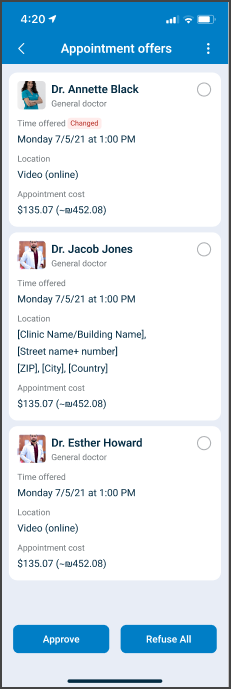
This screen includes:
| # | Element | Description |
|---|---|---|
| 1 | Offer message | States that the requested profile offers alternative appointments |
| 2 | Alternative cards | Display applicable doctor, date, time, visit type or location, language, fee, and prescription information |
| 3 | Alternative selector | Selects one appointment alternative |
| 4 | Decline all action | Declines all available alternatives |
| 5 | Accept action | Accepts the selected alternative |
| 6 | Close action | Closes the appointment offer screen |
Workflow
- Call
PUT /api/v3/appointments/{appointment-id}/approve. - Display the available alternative appointments.
- Review the details for each alternative.
- Select one alternative.
- Apply the selection through
PATCH /api/v3/appointments/{appointment-id}/approve/select. - Select Accept to submit the selected alternative.
- Call
POST /api/v3/appointments/{appointment-id}/approve.
The patient can select Decline all instead of an alternative.
Offer selection
Only one alternative can be active at a time. A new selection replaces the current selection.
Validations
| Scenario | App behavior | SDK output |
|---|---|---|
| No alternative is selected | Require a selection before acceptance | No approval submission |
| Alternative is selected | Mark the selected card and allow acceptance | PATCH update |
| Different alternative is selected | Replace the active selection | PATCH update |
PUT request returns 200 | Display the alternative offers screen | Page object |
PUT request returns 405 | Display an application error | Error response |
| Session is invalid | Reject the request | Authentication error |
Actions
| Scenario | App behavior | SDK output |
|---|---|---|
| Alternative offers screen opens | Load the available offers | PUT /api/v3/appointments/{appointment-id}/approve |
| Alternative selected | Mark the offer as selected | PATCH /api/v3/appointments/{appointment-id}/approve/select |
| Different alternative selected | Replace the current selection | PATCH update |
| Accept selected | Accept the selected alternative | POST /api/v3/appointments/{appointment-id}/approve |
| Decline all selected | Decline all displayed alternatives | Decline action |
| Close selected | Close the appointment offer screen | Close action |
Endpoint Resources
Approve Alternative Offer
PUT
v3/appointments/{appointment-id}/approve
Displays the alternative offers screen for the specified appointment.
Select Card
PATCH
v3/appointments/{appointment-id}/approve/select
Updates the active offer selection for the specified appointment.
Approve Offer
POST
v3/appointments/{appointment-id}/approve
Accepts the selected alternative for the specified appointment.