Use the Charges section to display appointment pricing, discounts, and total cost.
Displayed values derive from the pricing response and active currency configuration.
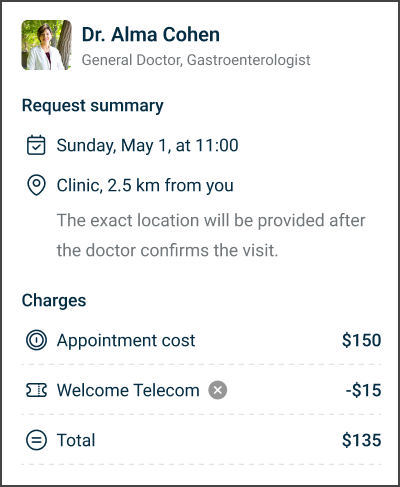
This screen includes:
| # | Element | Description |
|---|
| 1 | Appointment cost | Displays the base appointment price |
| 2 | Promo discount | Displays the applied discount when available |
| 3 | Total amount | Displays the calculated total |
| 4 | Primary currency | Displays the appointment currency |
| 5 | Converted value | Displays approximate converted pricing when available |
Workflow
This flow starts when the Charges section renders.
- Render pricing data.
- Display appointment cost.
- Apply promo discount when available.
- Calculate the total amount.
- Update converted values when applicable.
Currency Behavior
| Scenario | Behavior |
|---|
| Same currency | Display a single currency value |
| Different currency | Display approximate converted value |
| Conversion available | Display converted amount with ~ |
| Scenario | Behavior |
|---|
| Promo applied | Display discount row |
| Promo removed | Remove discount row |
| Pricing updated | Recalculate total |
Validations
| Scenario | App Behavior | SDK Output |
|---|
| Pricing unavailable | Hide charges section | pricing = unavailable |
| Currency conversion unavailable | Hide converted value | conversion = unavailable |
| Promo applied | Display discount row | discount = applied |
| Promo invalid | Remove discount | error = invalid_promo |
| Total recalculated | Refresh pricing | pricing = updated |
Actions
| Scenario | App Behavior | SDK Output |
|---|
| Pricing loaded | Render pricing section | pricing = loaded |
| Promo applied | Update total amount | discount = applied |
| Promo removed | Refresh pricing | discount = removed |
| Currency updated | Refresh converted values | conversion = updated |
| Charges updated | Refresh displayed pricing | pricing = updated |