Patient Voucher
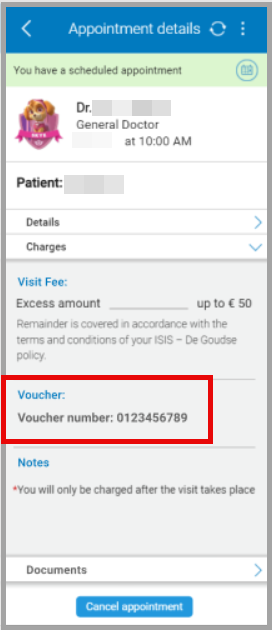
The Patient Voucher screen displays visit fees, voucher status, and insurer-provided information for a confirmed appointment.
note
Local coverage displays voucher details. Travel coverage hides voucher details.
This screen includes
- Header - Doctor name, specialty, date, and time.
- Patient label - Time section
- Location and contact details
- Clinic comments (when available)
- Disclaimers (when provided)
- Charges section
- Visit fee
- Voucher status (local coverage only)
- Notes
- Documents list
- Cancel appointment action
Workflow
This flow starts when the Patient Voucher screen is open.
- Open this screen from Appointment Details.
- Select Patient Voucher.
- Review visit fee text, voucher status, notes, and disclaimers.
- Select Cancel appointment and confirm when the appointment no longer applies.irm.
Validations
These rules determine visibility and data consistency.
| Scenario | App Behavior | SDK Output |
|---|---|---|
| Coverage type is travel. | Hide voucher section. | Voucher data not included. |
| Coverage type is local. | Display voucher section. | Voucher data included. |
| Voucher state available. | Display one status value. | voucher.status = <value>. |
| No disclaimers provided. | Hide disclaimers section. | No disclaimer data. |
| Screen rendered. | Display read-only data. | No editable state. |
Actions
| Scenario | App Behavior | SDK Output |
|---|---|---|
| Screen opened. | Render voucher and fee details. | Appointment data loaded. |
| Cancel appointment selected. | Open confirmation dialog. | Cancellation request initiated. |
| Cancellation confirmed. | Cancel appointment. | Appointment status updated. |
| Screen closed. | Return to previous screen. | No state change. |