Update Payment Method
Use Update Payment Method when the payment method for an appointment requires an update before the user can continue.
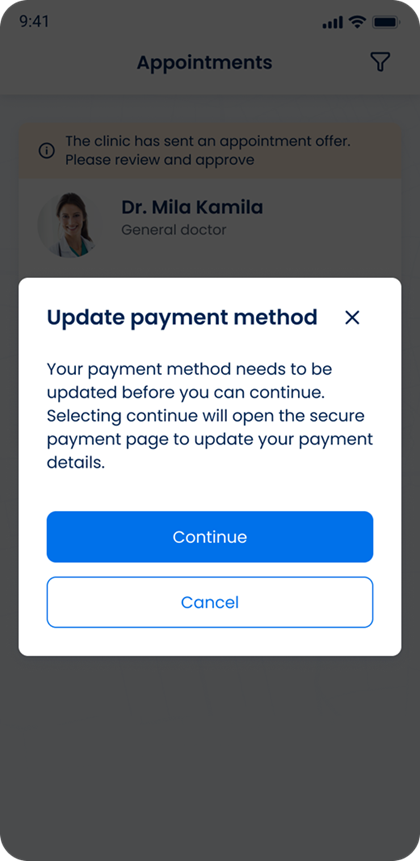
This screen includes:
| # | Element | Description |
|---|---|---|
| 1 | Update message | States that the payment method requires an update |
| 2 | Continue action | Opens the secure payment page |
| 3 | Cancel action | Closes the popup |
| 4 | Close action | Closes the popup |
Workflow
- Call
PUT /api/v3/appointments/{appointment-id}/approve/update-payment-method. - Render the returned popup.
- Select Continue to open the secure payment page.
- Select Cancel or the close action to dismiss the popup.
Validations
| Scenario | App behavior | SDK output |
|---|---|---|
| Payment method requires an update | Display the update payment popup | Page response |
| Request fails | Display the applicable error | Error response |
Actions
| Scenario | App behavior | SDK output |
|---|---|---|
| Update Payment Method opens | Display the payment update prompt | PUT /api/v3/appointments/{appointment-id}/approve/update-payment-method |
| Continue selected | Open the secure payment page | Navigation action |
| Cancel selected | Close the popup | Close action |
| Close selected | Close the popup | Close action |
Endpoint Resources
Update Payment Method
PUT
v3/appointments/{appointment-id}/approve/update-payment-method
Returns a popup that prompts the user to update the payment method for the specified appointment.