Edit Search
Use the Doctor List Edit Search screen to update the location and service used for doctor search results.
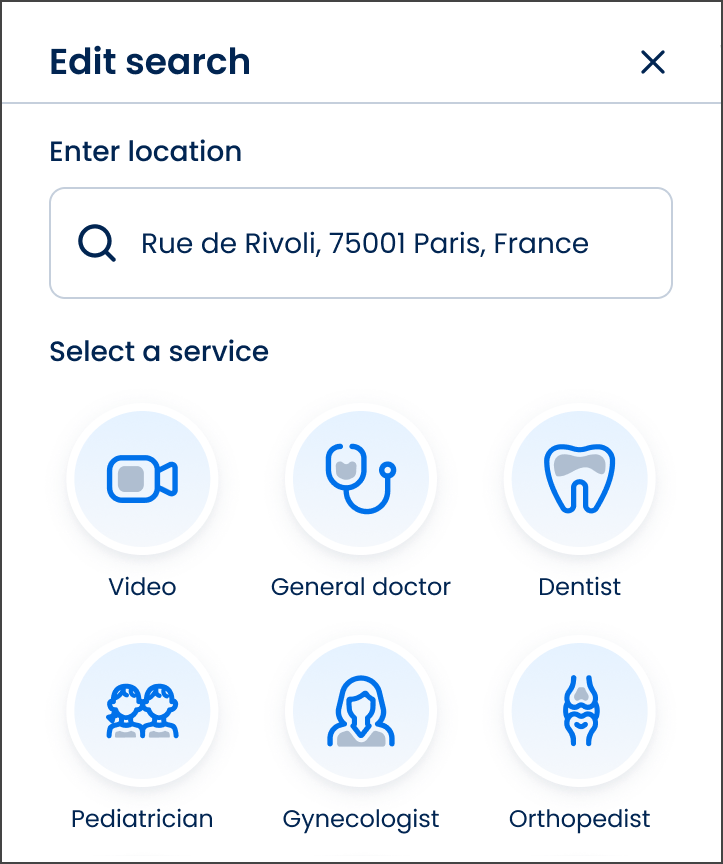
This screen includes:
| # | Element | Description |
|---|---|---|
| 1 | Header | Displays the Edit search title |
| 2 | Close action | Dismisses the search screen |
| 3 | Location section | Displays the selected search location |
| 4 | Location input | Displays and updates the search address |
| 5 | Service selection section | Displays available service categories |
| 6 | Service option | Selects a service category for the search |
Workflow
- Open the Doctor List screen.
- Select Edit Search.
- Update the search location or service.
- Save the updated search criteria.
- Refresh the doctor list with the new criteria.
Validations
| Scenario | App Behavior | SDK Output |
|---|---|---|
| Location missing | Disable search update | validation = location_required |
| Service missing | Disable search update | validation = service_required |
| Location updated | Refresh search criteria | location = updated |
| Service updated | Refresh search criteria | service = updated |
| No matching results | Display empty state | results = empty |
| Search request fails | Display error state | status = 405 |
Actions
| Scenario | App Behavior | SDK Output |
|---|---|---|
| Edit Search opened | Load search criteria screen | PUT /api/v3/doctors/edit-search |
| Location updated | Update search location | location = updated |
| Service selected | Update search specialty | service = selected |
| Search criteria saved | Refresh doctor list | POST /api/v3/doctors/edit-search |
| Close selected | Dismiss screen | navigation = dismiss |
| Search completed | Return updated doctor list | navigation = doctor_list |
Endpoint Resources
Edit Search
PUT
v3/profiles/edit-search
Opens the search edit screen where the patient can select a service.
Save Searching
POST
v3/doctors/edit-search
Saves the selected search criteria and redirects to the doctor list.