Existing Appointment
Use Existing Appointment to notify users when an appointment already exists for the selected specialty.
The popup appears before booking continues and allows the user to review the warning or continue with another booking.
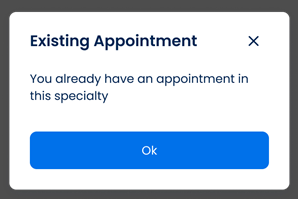
This screen includes:
| # | Element | Description |
|---|---|---|
| 1 | Warning message | Indicates that an appointment already exists for the selected specialty |
| 2 | OK action | Dismisses the popup |
| 3 | Book another visit action | Continues the booking flow |
| 4 | Modal container | Displays the scheduled appointment warning |
| 5 | Background overlay | Prevents interaction with the underlying screen while the popup is open |
Workflow
- Open appointment scheduling.
- Select a doctor and specialty.
- Detect an existing appointment in the selected specialty.
- Display the Scheduled Appointment popup.
- Select OK to dismiss the popup or Book another visit to continue booking.
Validations
| Scenario | App Behavior | SDK Output |
|---|---|---|
| Existing appointment found | Display Scheduled Appointment popup | status = scheduled |
| No existing appointment found | Continue booking flow | status = available |
| Request blocked | Display restriction message | status = error |
Actions
| Scenario | App Behavior | SDK Output |
|---|---|---|
| Popup loaded | Display scheduled appointment warning | PUT /api/v3/wizard/time-location-selection/scheduled-appointment-popup |
| OK selected | Dismiss popup | state = dismissed |
| Book another visit selected | Continue booking flow | navigation = continue |
Endpoint Resources
Existing Appointment
PUT
v3/wizard/time-location-selection/info/scheduled-appointment
Opens a popup that informs the user about an existing appointment in the selected specialty.