Scheduled Appointment
Use Scheduled Appointment to open an existing appointment from the time and location selection flow.
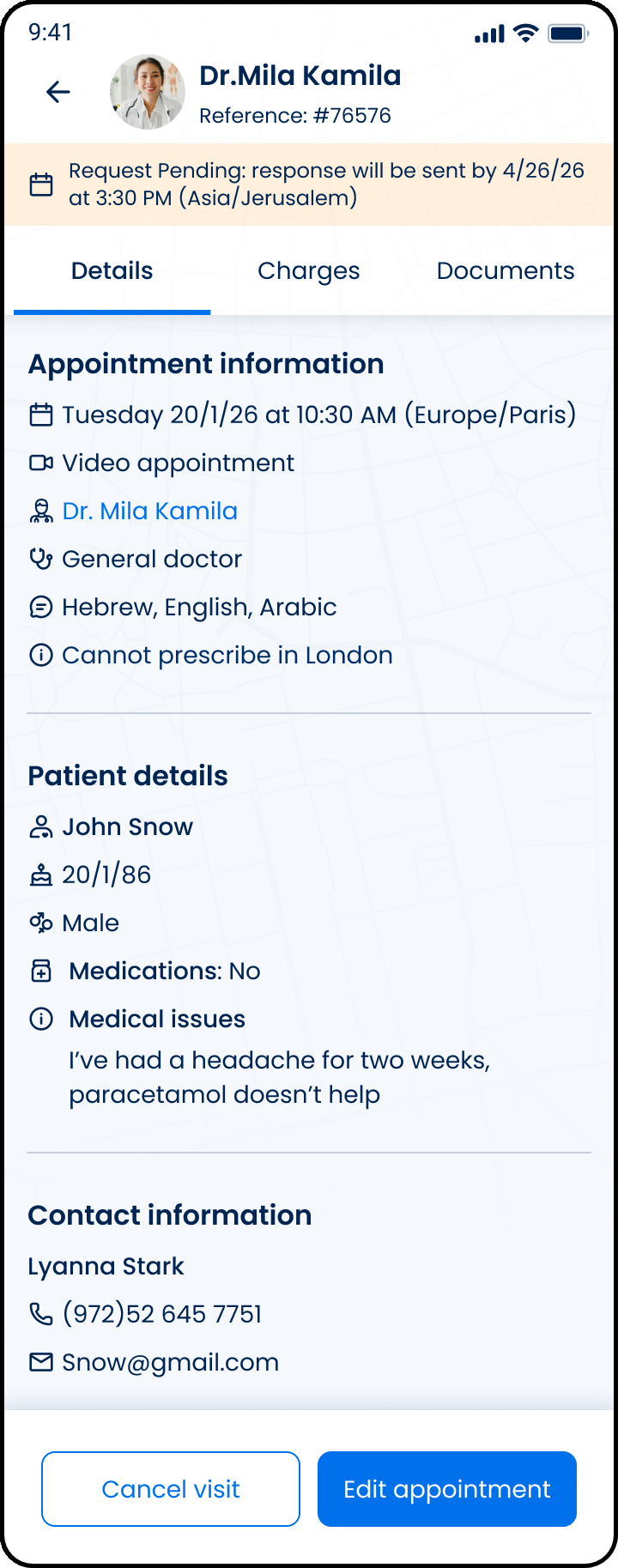
This screen includes:
| # | Element | Description |
|---|---|---|
| 1 | Scheduled appointment header | Displays the doctor, reference number, and back navigation. |
| 2 | Request status banner | Shows the pending response date and time. |
| 3 | Appointment tabs | Provides access to Details, Charges, and Documents. |
| 4 | Appointment information | Displays the appointment date, visit type, doctor, specialty, languages, and prescription limitation. |
| 5 | Patient details | Displays the patient name, date of birth, gender, medications, and medical issue. |
| 6 | Contact information | Displays the contact name, phone number, and email address. |
| 7 | Cancel visit action | Opens the visit cancellation flow. |
| 8 | Edit appointment action | Opens the appointment edit flow. |
Workflow
- Open a scheduled appointment.
- Load the appointment details.
- Display the request status, appointment information, patient details, and contact information.
- Select Charges or Documents to view related appointment data.
- Select Cancel visit to start cancellation.
- Select Edit appointment to update the appointment.
Validations
| Scenario | App behavior | SDK output |
|---|---|---|
| Session invalid | Block request | state = unauthenticated |
| Appointment missing | Display error state | error = appointment_required |
| Appointment found | Display scheduled appointment screen | appointment = loaded |
| Appointment status pending | Display pending response banner | status = pending |
| Request rejected | Display error state | status = 405 |
Actions
| Scenario | App behavior | SDK output |
|---|---|---|
| Screen opens | Load scheduled appointment screen | PUT /api/v3/wizard/time-location-selection/info/scheduled-appointment |
| Details selected | Display appointment details | tab = details |
| Charges selected | Display appointment charges | tab = charges |
| Documents selected | Display appointment documents | tab = documents |
| Cancel visit selected | Open cancellation flow | navigation = cancel_visit |
| Edit appointment selected | Open appointment edit flow | navigation = edit_appointment |
| Back selected | Return to previous screen | navigation = back |
Endpoint Resources
Scheduled Appointment
PUT
v3/wizard/time-location-selection/info/scheduled-appointment
Returns the scheduled appointment screen for the current appointment context.