Add New Patient
Use the Add a new patient modal to create a patient profile during the appointment request flow.
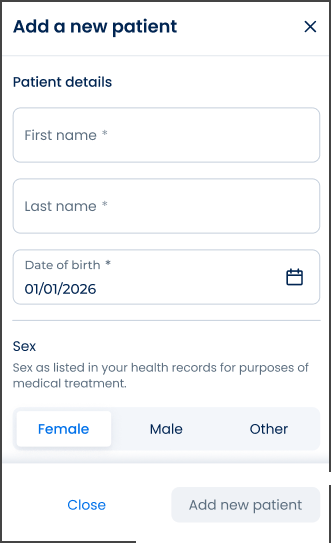
This screen includes:
| # | Element | Description |
|---|---|---|
| 1 | Modal title | Displays Add a new patient |
| 2 | Close action | Dismisses the modal without changes |
| 3 | First name field | Required patient first name |
| 4 | Last name field | Required patient last name |
| 5 | Date of birth field | Required date of birth with date picker |
| 6 | Sex selector | Selects Female, Male, or Other |
| 7 | Close action | Closes the modal without creating a patient |
| 8 | Add new patient action | Creates the patient profile |
Workflow
- Open the appointment request flow.
- Select Patient name.
- Select Add a new patient.
- Enter the required patient details.
- Select Add new patient.
- Return to the appointment request with the new patient available for selection.
Validations
| Scenario | App Behavior | SDK Output |
|---|---|---|
| Required field empty | Disable Add new patient or show field error | validation = required |
| Date of birth invalid | Display date field error | error = invalid_date_of_birth |
| Sex not selected when required | Disable Add new patient | validation = required |
| Non-Latin name requires Latin fields | Display Latinized name fields | latinFields = required |
| Request in progress | Show loading state | state = loading |
| Request blocked | Display restriction message | HTTP 405 |
Actions
| Scenario | App Behavior | SDK Output |
|---|---|---|
| Screen opened | Load patient creation form | PUT /api/v3/patients/create |
| Patient details entered | Update local form state | patient = updated |
| Date picker selected | Update date of birth | dateOfBirth = updated |
| Sex selected | Update sex value | sex = updated |
| Add new patient selected | Submit patient creation request | Create request triggered |
| Patient creation succeeds | Add patient to the request flow | patient = saved |
| Close selected | Dismiss modal without changes | No state change |
Endpoint Resources
New Patient
PUT
v3/patients/create
Provides the new patient creation form and required onboarding fields.
Validate First Name
PATCH
v3/patients/create/validate/first-name
Validates the patient’s first name and updates Latin name field visibility.
Validate First Name
PATCH
v3/patients/create/validate/last-name
Validates the patient’s last name and updates Latin name field visibility.
Create Patient
POST
v3/patients/create
Creates a new patient profile with personal details.