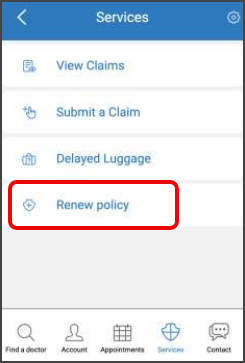
Renew Policy
Use the Renew Policy entry to move the user from the Air Doctor app to the insurer renewal channel.
The entry appears on the New Services page only when the user has active coverage and the insurer exposes at least one additional service beyond Find a Doctor.
The layout shows Renew Policy only when the insurer configuration excludes a bottom menu.
Integrators use this entry to provide a direct and insurer-controlled renewal path.
This screen includes:
- New Services page with insurer services.
- Renew Policy card for eligible insurers and users.
- Summary of the active coverage when configured.
- One entry point to the insurer renewal channel.
- Automatic return to the invoking flow when the channel closes.
The Renew Policy card does not appear when the insurer provides only Find a Doctor or when the user does not have eligible coverage.
Workflow
-
Open the app with a user who has at least one active policy.
-
Navigate to the New Services page.
The page appears only when the insurer enables extra services and does not use a bottom menu. -
Review the available service cards.
The list includes Find a Doctor and any additional insurer services, such as Renew Policy. -
Select the Renew Policy card.
The app opens the insurer renewal channel. -
Complete or dismiss the renewal flow.
When the user closes the channel, the app returns to the previous screen.
The Renew Policy card does not appear when the insurer disables renewal or when the user does not have an eligible policy.
Coverage state and session state remain unchanged.
Validations
Renew Policy requires associated coverage
Check: The app verifies that the profile includes at least one associated policy.
Failure result: The SDK returns an error that indicates no available policy coverage and the app blocks the Renew Policy option.
Insurer must expose additional services
Check: The app verifies that the insurer exposes at least one service beyond Find a Doctor.
Failure result: The SDK returns a configuration error and the app hides all additional service cards.
Layout requires no bottom menu
Check: The app verifies that no bottom menu is active for this navigation path.
Failure result: The SDK returns a layout restriction error and the app prevents access to the New Services page.
Renewal configuration must be valid
Check: The app verifies that the insurer provides a valid renewal target when the user selects the Renew Policy card.
Failure result: The SDK returns a renewal-configuration error and the app blocks the flow.
Service availability must match the active policy
Check: The app verifies that the selected service is available under the currently active policy.
Failure result: The SDK returns a service-availability error and the app hides or blocks services that the active policy does not allow.
Renewal channel must be available
Check: The app verifies that the renewal channel loads correctly.
Failure result: The SDK returns a channel-unavailable error and the app shows an error message and a fallback option.
Actions
Open the New Services page
Operation: The app verifies layout and policy constraints and shows the New Services page when all validations pass.
SDK result: The SDK returns a navigation-success event.
Start the Renew Policy flow
Operation: The app verifies renewal configuration and opens the Renew Policy flow when the insurer exposes a valid target.
SDK result: The SDK returns a renewal-flow event.
Select a service for the active policy
Operation: The app verifies that the service is permitted under the active policy and opens the next screen when valid.
SDK result: The SDK returns a service-selection event.
Show fallback when the renewal channel is unavailable
Operation: The app shows an error message and shows the fallback option when the renewal channel fails.
SDK result: The SDK returns a fallback-activation event.
.
Endpoint Resources
🧰 Endpoint Resources under construction