Notification Settings
Use Notification Settings to configure appointment and service notification channels.
Available channels and validation rules derive from the account notification configuration.
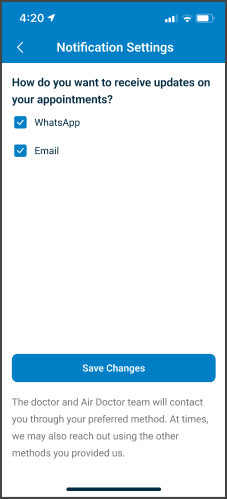
This screen includes:
| # | Element | Description |
|---|---|---|
| 1 | Phone number display | Displays the verified account phone number |
| 2 | Contact methods | Displays WhatsApp, SMS, and Email options |
| 3 | Selection controls | Enables or disables notification channels |
| 4 | Save Changes action | Saves notification preferences |
| 5 | Update Details action | Opens contact information update flow |
| 6 | Validation modal | Displays validation errors when required |
Workflow
- Open Notification Settings.
- Render available notification channels.
- Select one or more contact methods.
- Update contact details when required.
- Save notification preferences.
- Refresh the notification state.
Regional Restrictions
| Region | Behavior |
|---|---|
+972 | SMS unavailable |
+34 | SMS unavailable |
Synchronization Behavior
- Notification preferences apply at the account level.
- Preference updates synchronize across supported platforms.
- Existing opt-out restrictions override API updates.
- Linked partner platforms may provide default notification preferences.
Validation rules
| Scenario | App Behavior | SDK Output |
|---|---|---|
| No contact methods selected | Block save action | error = contact_method_required |
| Email enabled with invalid email | Display validation error | error = invalid_email |
| SMS enabled with invalid phone | Display validation error | error = invalid_phone |
| SMS unsupported for region | Disable SMS option | sms = restricted |
| WhatsApp or SMS opt-out enforced | Disable restricted channel | channel = disabled |
| Session invalid | Block access | state = unauthenticated |
| SDK version unsupported | Display upgrade error | status = 422 |
Actions
| Scenario | App Behavior | SDK Output |
|---|---|---|
| Notification settings opened | Load notification preferences | PUT /api/v3/account/notifications |
| Contact method updated | Update pending preference state | preferences = updated |
| Save Changes selected | Persist notification preferences | POST /api/v3/account/notifications |
| Preferences saved | Refresh notification state | state = saved |
| Update Details selected | Open contact update flow | navigation = update_details |
| Save rejected | Preserve previous valid state | state = unchanged |
Endpoint Resources
Notification Settings
PUT
v3/account/notifications
Returns notification settings and available channels
Save Notification Preferences
POST
v3/account/notifications
Persists notification preferences