Reset Password
Use Reset Password to let the user create a new password after opening a reset link from email.
This screen uses a reset token and does not require an authenticated session.
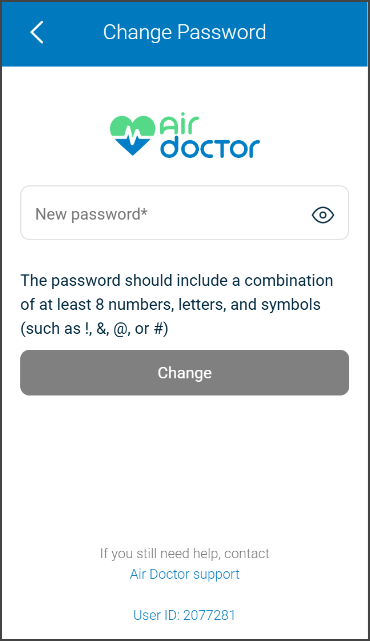
This screen includes:
| # | Element | Description |
|---|---|---|
| 1 | Header | Displays Change Password title and back navigation. |
| 2 | Branding | Displays the Air Doctor logo. |
| 3 | Password field | Accepts the new password and includes a visibility toggle. |
| 4 | Password requirements | Displays password complexity rules. |
| 5 | Primary action | Displays Change and submits the reset password request. |
| 6 | Support link | Opens Air Doctor support for assistance. |
| 7 | User identifier | Displays the user ID. |
Reset Password
The Reset Password link starts the password recovery flow. This flow does not use the authenticated Change Password logic. Use it only when the user cannot provide the current password.
Workflow
- Open the reset password link from email.
- Load the Reset Password screen with the reset token.
- Enter a new password.
- Check password strength.
- Submit the reset password request.
- Complete the reset and return to sign in.
Validations
| Scenario | App behavior | SDK output |
|---|---|---|
| Reset token invalid or missing | Display error screen | error = invalid_token |
| Password empty or invalid | Disable Change and show requirement state | validation = invalid |
| Password valid | Enable Change | validation = valid |
| Request in progress | Show loading state | state = loading |
| Reset succeeds | Complete reset and return to sign in | state = password_reset |
| Request blocked | Display restriction message | status = 405 |
Actions
| Scenario | App behavior | SDK output |
|---|---|---|
| Screen opened | Load screen with reset token | PUT /api/v3/account/password/reset?id=<token> |
| Password updated | Update input state | password = updated |
| Password strength checked | Update password requirement hints | PATCH /api/v3/account/password/check-strength |
| Visibility toggle selected | Toggle password visibility | passwordVisible = true/false |
| Change selected | Submit reset password request | POST /api/v3/account/password/reset |
| Back selected | Exit screen | navigation = back |
| Support selected | Open support channel | navigation = support |
Endpoint Resources
Reset Password
PUT
v3/account/password/reset
Returns the page definition for the Set New Password screen when a valid reset token is provided.
UI Element Types
| Level | Reference | Type | Value | Placement |
|---|---|---|---|---|
| 1 | logo | Illustration | AirDr Logo | ^100 |
| 1 | email-sent | Regular | Email sent. Please check your email to get reset password link | ^ |
| 1 | spacer | Spacer | — | — |
| 1 | ok | Button | OK | — |
| 1 | spacer | Spacer | — | — |
| 1 | need-help | Regular | If you still need help, contact | ^ |
| 1 | support | Link | Air Doctor Support | ^ |
Check Password Strength
PATCH
v3/account/password/check-strength
Checks the new password strength and updates the password requirement hints.
Reset Password
POST
v3/account/password/reset
Updates the user password using the reset token.