Email Sent Confirmation
Use the Reset Password → Email Sent Confirmation screen to confirm that the password recovery email was sent.
The app displays this screen after submitting a valid email address in the Reset Password Request flow.

This screen includes:
- A confirmation message that indicates a reset email leaves the system.
- A branding illustration (Air Doctor logo or similar).
- An OK button that dismisses the screen.
- A Contact Support link for users who need help.
- Static content only; the screen contains no input fields.
- Automatic display after a successful password reset request.
Workflow
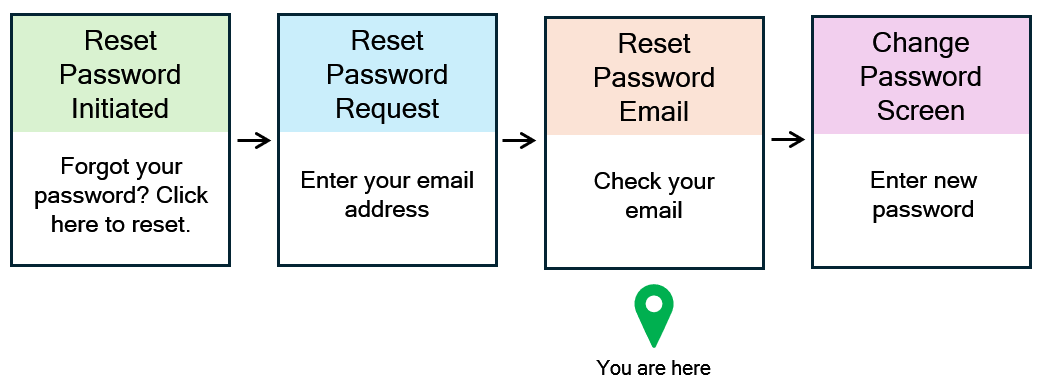
- The user submits a valid email address in the Reset Password Request screen.
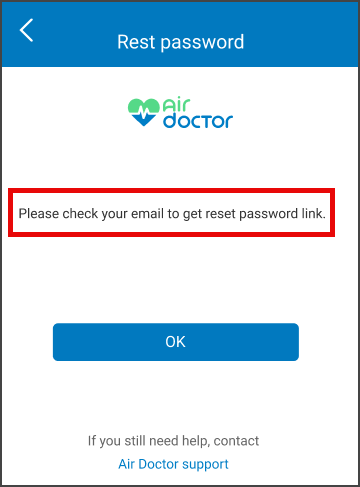
- The app displays the Email Sent Confirmation screen.
- The user selects OK to close the confirmation screen.
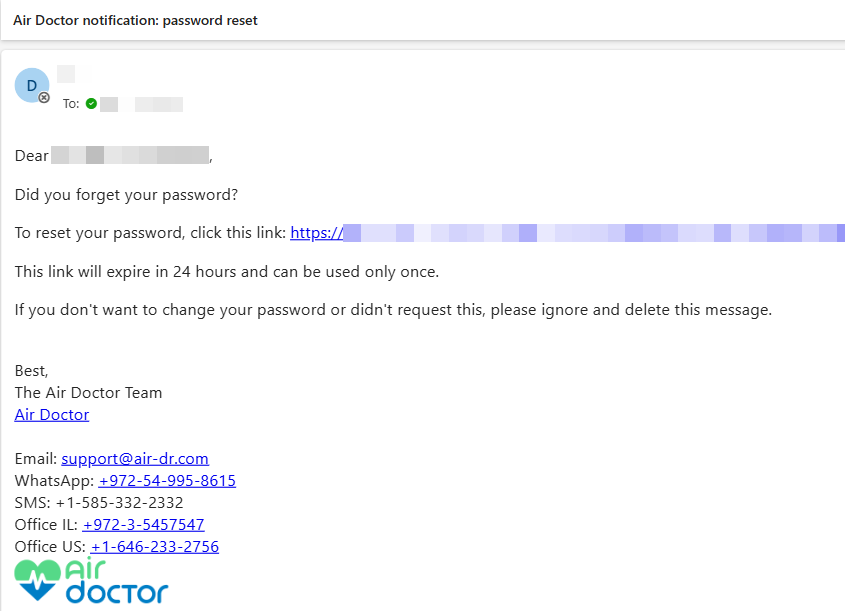
- The user opens the password reset email and select the link.
- The user continues to the Change Password screen to complete the reset.
Validations
| Scenario | App Behavior | SDK Output |
|---|---|---|
| Reset Password Request flow does not complete. | Does not display the confirmation screen. | Returns the request screen state. |
| Email address is not valid or not registered. | Displays an error on the request screen instead of this confirmation. | Returns a validation error for the email field. |
| User attempts to open the confirmation screen directly. | Blocks access and routes back to the request or login screen. | Returns a state that indicates no verified reset context. |
The confirmation screen requires a valid reset request context and denies navigation when the session or context is incomplete.
Actions
| Scenario | App Behavior | SDK Output |
|---|---|---|
| Reset Password Request accepts a valid email address. | Confirms that the app sends a password reset email and displays the confirmation screen. | Returns a success state for the reset request. |
| User views the confirmation screen. | Displays a static success message with a support link. | Does not modify session state. |
| User selects OK. | Closes the confirmation screen and returns to the prior navigation context. | Returns control to the host app or calling flow. |
The confirmation screen does not send additional requests and does not change authentication state.
Endpoint Resources
Reset Password Email Sent
PUT
v3/account/password/reset/request/successful
This endpoint configures the confirmation screen that indicates a password reset email was sent and instructs the user to check the inbox.
UI Element Types
| Level | Reference | Type | Value | Placement |
|---|---|---|---|---|
| 1 | logo | Illustration | AirDr Logo | ^100 |
| 1 | email-sent | Regular | Email sent. Please check your email to get reset password link | ^ |
| 1 | spacer | Spacer | — | — |
| 1 | ok | Button | OK | — |
| 1 | spacer | Spacer | — | — |
| 1 | need-help | Regular | If you still need help, contact | ^ |
| 1 | support | Link | Air Doctor Support | ^ |
Reset Password Link Request
POST
v3/account/password/reset/request
This endpoint sends a password reset email to the specified address and triggers the Email Sent Confirmation screen in the client flow.