First Available Doctor
Use the First Available Doctor (ASAP) flow to connect a patient with the next available doctor for immediate consultation. The app assigns a doctor automatically by availability and selected visit type.
important
This option displays only when the user selects General doctor.
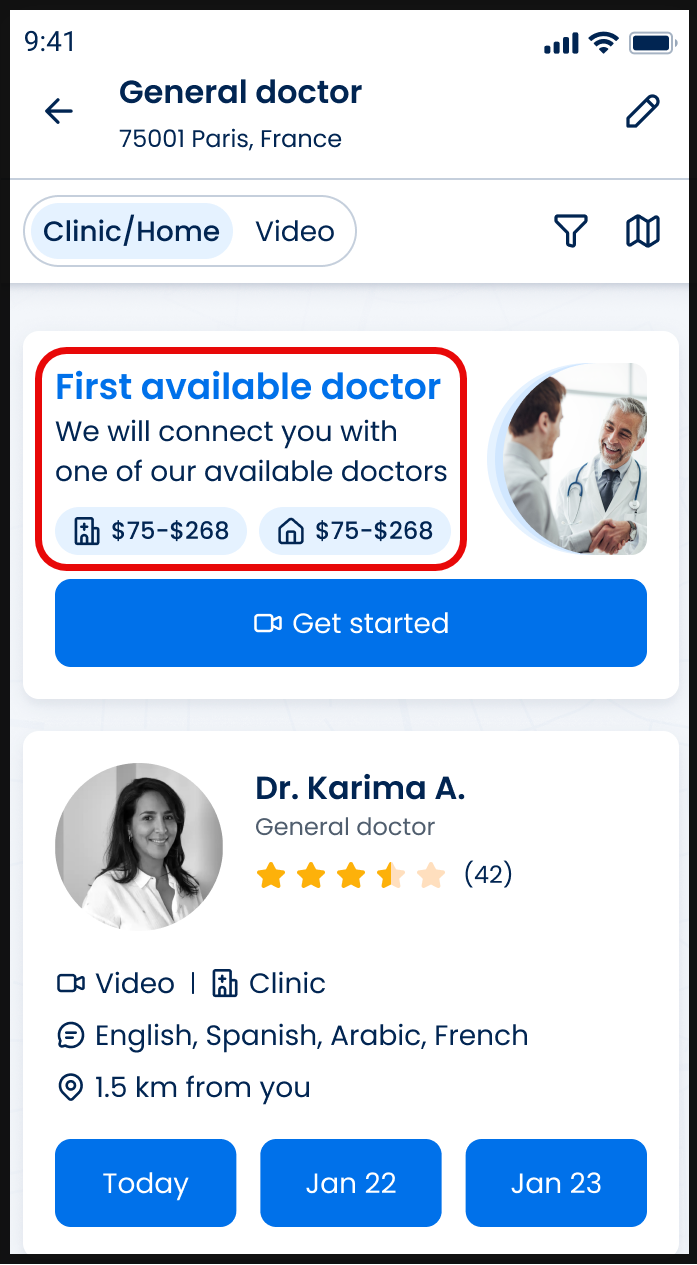
This screen includes:
- Primary action
- First available doctor section to connect with the next available doctor
- Get started action to initiate booking
- Pricing - Dynamic pricing range for clinic and home visits
- Visit selection - Visit type selection for Clinic/Home or Video
- Context - Location context showing selected service area
- Controls - Filter and map controls to refine or view results
Workflow
This flow describes how a patient initiates and proceeds with an ASAP consultation. This screen presents a price range and allows the patient to proceed without selecting a specific doctor.
Coverage behavior
Covered patients bypass this screen and proceed directly to a scheduled appointment.
- Open the Doctor List.
- Select a visit type:
- Clinic/Home
- Video
- Locate the First Available Doctor card.
- Select Get started.
- Continue with the Appointment Request flow.
Validations
| Condition | App behavior | SDK output |
|---|---|---|
| Patient is not authenticated | Block access to the flow | Authorization error |
| Patient type is covered | Skip this flow and proceed with automatic appointment scheduling | Redirect to scheduled appointment flow |
| Visit type selection changes | Update doctor matching and price range | Updated matching criteria and pricing range |
| Pricing rules apply | Display calculated price range based on configured limits | Computed pricing range |
Actions
| Condition | App behavior | SDK output |
|---|---|---|
| Select Get started | Start doctor matching and proceed to appointment request flow | Trigger matching process and navigation |
| Matching completes | Assign next available doctor by availability and visit type | Assigned doctor object |
| Price range updates | Reflect updated pricing based on visit type or configuration | Updated pricing payload |
| Flow continues | Navigate to the appointment request screen | Navigation |
Endpoint Resources
Wizard for ASAP (First Available Doctor)
PUT
v3/wizard/asap
Return wizard screen for booking an ASAP appointment with the first available provider.