Doctor Details
The Doctor Details screen displays doctor profile data and availability for a given doctor.
This screen is part of the doctor selection and booking flow.
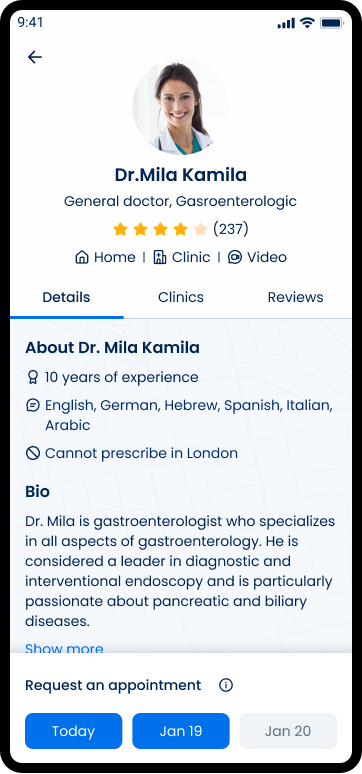
This screen includes:
- Doctor header — Image, name, specialty, rating, review count.
- Date selector — Available booking dates.
- Details tab — Experience and languages.
- About tab — Biography, education, license.
- Clinics tab — Clinic list.
- Reviews tab — Patient reviews.
Workflow
- From the doctor search results or an existing booking context, the client provides a valid
doctorId. - The SDK requests doctor profile, availability, clinics, and reviews for the specified
doctorId. - The Doctor details screen renders the header, date selector, and default tab after a successful response.
Validations
| Condition | App behavior | SDK output |
|---|---|---|
| Valid authenticated session | Render screen | Successful response |
| Missing or invalid session | Block rendering | Authorization error |
Valid doctorId | Display profile data | Response with doctor details |
Invalid doctorId | Display error state | Error response |
| Availability present | Enable date selection | Availability entries returned |
| No availability | Disable date selection | Empty availability set |
| Selected date valid | Allow continuation | Valid selection |
| Selected date invalid | Block selection | Validation error |
| Clinics available | Render Clinics tab | Clinic data returned |
| Reviews available | Render Reviews tab | Review data returned |
Actions
| Condition | App behavior | SDK output |
|---|---|---|
| Screen loads | Request doctor details | Request sent with doctorId |
| Response succeeds | Render data | Response payload |
| Date selected | Update selection state | Local state update |
| Tab selected | Render selected tab | No request |
| Clinic selected | Navigate to clinic context | Navigation action |
| Request fails | Display error state | Error response |