Home Visit Details
Use the Home Visit Details screen to collect and resolve the visit address for a Home appointment.
The platform returns availability and pricing based on the resolved location.
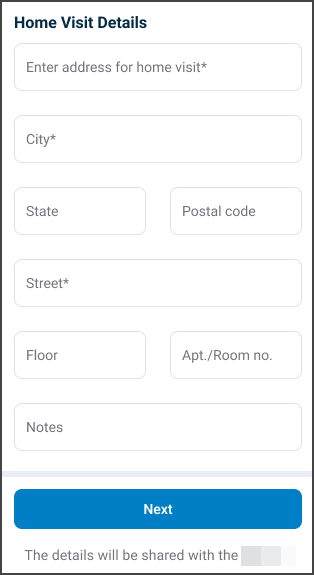
This screen includes
- Address field for street, number, and city.
- Optional Floor and Apartment or Room number fields.
- Optional Notes field for access instructions.
- Cost notice reflecting pricing based on resolved location.
- Next action enabled when required fields are valid.
- Informational text indicating that address details are shared with the doctor.
Workflow
- Enter the visit address.
- The platform resolves the location and returns availability and pricing.
- Review the updated cost and availability state.
- Select Next to continue.
Validations
| Condition | App behavior | SDK output |
|---|---|---|
| Required address field is missing | Disable Next and highlight field | Validation error for missing address |
| Address cannot be resolved | Display validation state | Address resolution error |
| Address outside service range | Disable home visit option | Availability error |
| Address input changes | Update cost notice | Updated pricing data |
| Input exceeds field limits | Block additional input | Field length validation error |
Actions
| Condition | App behavior | SDK output |
|---|---|---|
| Enter valid address | Update cost and enable progression | Response with resolved address and pricing |
| Enter out-of-range address | Disable progression | Availability error |
| Select Next | Proceed to next step | Updated appointment state |
| Navigate back | Discard changes | No state update |
| Request fails | Display error and block progression | Error response |