Prescriptions
The Prescriptions screen manages user interactions when booking a video visit with doctors who can or cannot prescribe in the patient’s location. The feature ensures patients receive clear disclaimers about prescription limitations. The screen is accessed in the booking wizard, doctor list screens, and when using the Uber card option. It applies only to logged-in patients booking video visits.
placeholder for screenshot
This screen includes
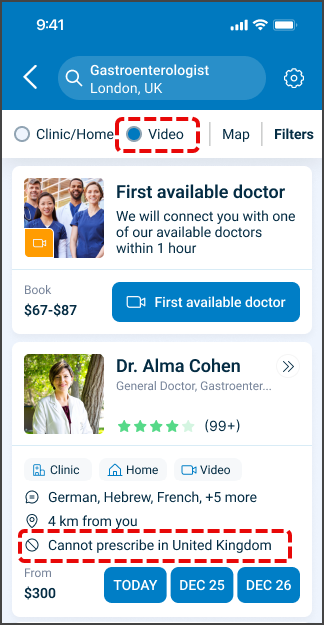
- Doctor prescription indicator. Displays if the selected doctor can prescribe in the patient’s current location.
- Disclaimer popup for prescribable doctors. Displays when booking with a doctor who can prescribe. The popup warns: Controlled substances (like psychiatric medicines and narcotics) cannot be prescribed during video appointments. It shows only once per session, even if the patient cancels and selects another prescribable doctor.
- Disclaimer popup for non-prescribable doctors. Displays when booking with a doctor who cannot prescribe in the patient’s location. The message reads: You selected a video visit with a doctor who cannot write prescriptions that can be filled in pharmacies in your current location. It includes a consent checkbox, an OK button (enabled only after consent), a Cancel button, and an optional filter instruction.
- Proceed and Back buttons. Allow navigation forward with the booking or backward in the wizard flow.
- Validation logic. OK requires explicit consent for non-prescribable doctors.
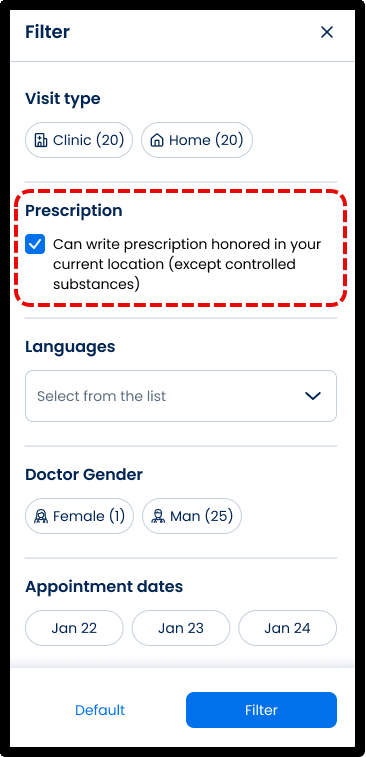
- Filter guidance. Once implemented, the popup instructs patients to use the Can Prescribe filter to find doctors who can prescribe in their location.
- Empty results page. Displays when no doctors match the selected filters, guiding patients to adjust filter settings.
Workflow
This workflow ensures patients understand prescription limitations and availability.
- A patient selects a doctor for a video visit.
- If the doctor can prescribe in the patient’s location:
- When the patient clicks a time slot or Uber card, the disclaimer appears with the message about controlled substances.
- Proceed continues the booking.
- Back returns to the previous wizard screen.
- The disclaimer shows only once per session.
- If the doctor cannot prescribe in the patient’s location:
- When the patient clicks Book Appointment, a disclaimer popup appears with the non-prescribable message.
- The consent checkbox must be checked to enable the OK button.
- Cancel or X closes the popup and keeps the patient on the same page.
- OK continues the booking.
- Once filtering is implemented, the popup will suggest using the Can Prescribe filter.
- If no doctors match the selected filters, the system displays an empty results page with guidance: We cannot find any doctors matching the criteria you selected. Please adjust your filter settings and try again.
placeholder for screenshot
Validations
- The consent checkbox must be checked before the OK button activates.
- The disclaimer shows only once per session for prescribable doctors.
- The disclaimer always shows for non-prescribable doctors.
- Controlled substances cannot be prescribed during video appointments.
- The system displays an empty results page if no doctors match filter settings.
Actions
- When a patient selects a prescribable doctor, the system displays the disclaimer once per session and allows forward or backward navigation.
- When a patient selects a non-prescribable doctor, the system enforces explicit consent before allowing booking.
- Cancel or X closes the popup and leaves the patient on the current screen.
- OK confirms consent and continues to the next step in the flow.
- When filters return no doctors, the system displays an empty state message prompting filter adjustment.
- Once filtering enhancements are live, the popup will guide patients to apply the Can Prescribe filter.
Endpoint Resources
🧰 Endpoint Resources under construction