Go Private
Some insurance partners allow patients to continue using the platform privately after policy limitations apply.
Use this section to understand how the platform transitions between insurance-based (B2B) and private (B2C) modes.
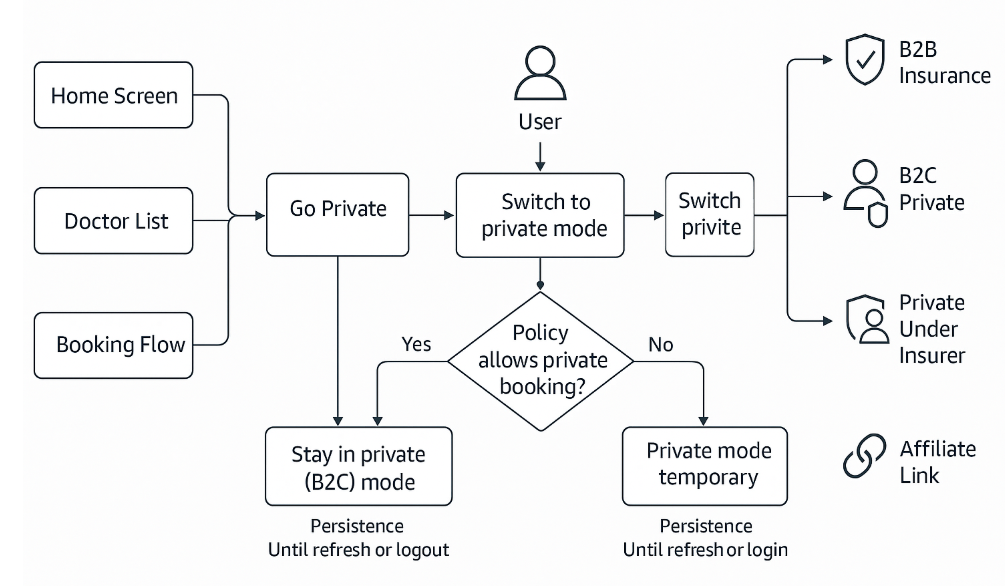
Coverage Mode Transitions
Use this section to understand how the platform determines and updates the active coverage mode.
The platform determines coverage eligibility, restriction states, and session mode.
The client renders the returned state, displays available actions, and updates the session through the SDK.
B2B Mode
The session starts in B2B mode when the user has an active eligible policy.
Restriction State
The platform returns a restriction state when the current request cannot proceed under the active policy.
Common triggers:
- Service is not covered.
- Doctor is not eligible.
- Policy limit is reached.
- Visit type or location is not available under policy terms.
The client must:
- Display the restriction state.
- Present available next actions.
Transition to B2C Mode
If private access is supported, the platform allows transition to B2C mode.
Trigger:
- The platform returns a restriction state.
- The client displays a Go Private action.
Behavior:
- The user selects Go Private.
- The client submits a session update request.
- The platform updates the session to B2C mode.
- The client reloads coverage-dependent UI.
B2C Mode Types
The platform supports multiple private access configurations.
The platform determines the active B2C mode based on insurer configuration and access rules.
| Mode | Branding | Restrictions | Payment | Description |
|---|---|---|---|---|
| Regular B2C Under Insurer | Insurer branding | Policy restrictions apply | User pays directly | Access limited by policy rules |
| Unrestricted B2C Under Insurer | Insurer branding | No restrictions | User pays directly | Full access under insurer branding |
| Affiliate Link | Affiliate branding (optional) | None | User pays directly | Full access via external referral |
| B2C (Private) | Air Doctor branding | None | User pays directly | Full unrestricted access |
Exit Points
The client may present the Go Private action at the following points:
-
Home Screen
- The platform returns a restriction state for the selected service.
- The client displays the private option.
- On selection, the client updates the session and reloads the Home screen.
- The platform returns results based on private access rules.
-
Doctor List
- The platform flags restricted doctors.
- The client displays the private option.
- On selection, the client updates the session to B2C mode.
-
Booking Flow
- The platform returns restriction or ineligibility states.
- The client displays the private option.
- On confirmation, the session updates and the flow continues.
Mode Persistence
Mode persistence depends on platform configuration.
-
Persistent private mode
- The platform stores B2C mode in the session context.
- The session remains in B2C mode across navigation and refresh.
-
Non-persistent private mode
- The platform applies B2C mode only for the current flow.
- The session resets after refresh or re-authentication.
The client must rely on the platform response to determine the active mode.
Return to B2B Mode
When the user selects an eligible insurance policy:
- The client submits a coverage selection request.
- The platform updates the session to B2B mode.
- The client refreshes coverage-dependent UI and pricing.
Private mode does not persist once a valid policy becomes active.
Private Under Insurer Mode
Some insurers support a hybrid mode that allows private booking under insurer context.
In this mode:
- The platform applies insurer branding and configuration.
- The platform may enforce selected policy constraints.
- The client renders insurer branding and updated availability.