Validate Coverage
Use Validate Coverage to display coverage validation results after policy submission.
Validation result screens derive from the coverage validation response.
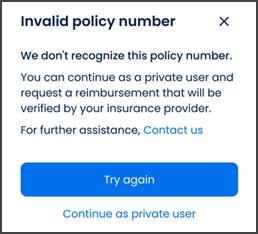
This screen includes:
| # | Element | Description |
|---|---|---|
| 1 | Header | Displays validation result title and close action |
| 2 | Validation message | Displays the policy validation result |
| 3 | Guidance text | Displays the next available action |
| 4 | Try again action | Returns to editable coverage fields |
| 5 | Private user action | Continues without coverage when available |
| 6 | Support action | Opens support when available |
Workflow
- Submit coverage data.
- Validate the policy.
- Display the validation result.
- Update additional fields when required.
- Retry with updated details or continue with an available alternative.
- Show success confirmation when coverage links successfully.
Validations
| Scenario | App Behavior | SDK Output |
|---|---|---|
| Policy not found | Display validation error | error = policy_not_found |
| Policy data incorrect | Display validation error | error = wrong_policy_data |
| Additional fields required | Render additional fields | fields = updated |
| Coverage linked | Display success state | coverage = linked |
| Private-pay unavailable | Hide private user action | private = unavailable |
| Request rejected | Display error state | status = 405 |
Actions
| Scenario | App Behavior | SDK Output |
|---|---|---|
| Policy not found | Show policy-not-found screen | PUT /api/v3/coverage/add/new-coverage/error/policy-not-found |
| Policy data incorrect | Show wrong-policy-data screen | PUT /api/v3/coverage/add/new-coverage/error/wrong-policy-data |
| Additional data required | Update coverage fields | PATCH /api/v3/coverage/add/new-coverage |
| Coverage linked | Show success confirmation | PUT /api/v3/coverage/add/new-coverage/success |
| Try again selected | Return to coverage form | state = editable |
| Private user selected | Continue without coverage | coverage = private |
Endpoint Resources
Show Policy not Found
PUT
v3/coverage/add/new-coverage/error/policy-not-found
Shows error popup if policy number was not found.
Update Fields
PATCH
v3/coverage/add/new-coverage
Shows additional data fields after policy validation.