Travel Dates
Use Travel Dates to display saved travel periods for a selected coverage.
Travel periods are grouped by status: ongoing, upcoming, and past.
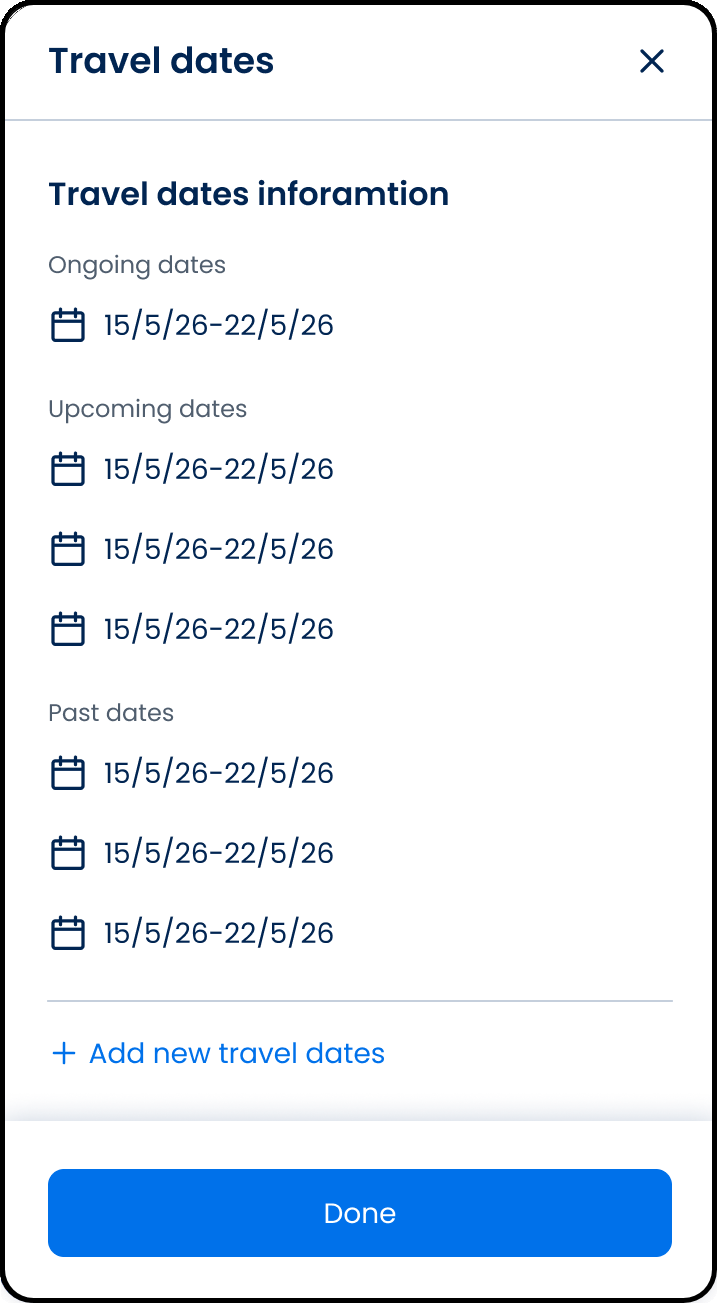
This screen includes:
| # | Element | Description |
|---|---|---|
| 1 | Header | Displays Travel dates title and close control |
| 2 | Travel dates information | Lists saved travel periods for the selected coverage |
| 3 | Ongoing dates | Displays the active travel date range |
| 4 | Upcoming dates | Displays future travel date ranges |
| 5 | Past dates | Displays completed travel date ranges |
| 6 | Date item | Displays a calendar icon and date range |
| 7 | Add new travel dates action | Opens the flow to add another travel period |
| 8 | Done action | Closes the screen |
Workflow
- Open My Coverage.
- Select Travel dates.
- Render saved travel periods.
- Group travel periods by status.
- Add another travel period when required.
- Select Done.
Validations
| Scenario | App Behavior | SDK Output |
|---|---|---|
| Travel dates exist | Display grouped date ranges | travelDates = grouped |
| No travel dates exist | Display empty state | travelDates = empty |
| Request in progress | Display loading state | state = loading |
| Request blocked | Display restriction message | status = 405 |
Actions
| Scenario | App Behavior | SDK Output |
|---|---|---|
| Travel dates exist | Display grouped date ranges | travelDates = grouped |
| No travel dates exist | Display empty state | travelDates = empty |
| Request in progress | Display loading state | state = loading |
| Request blocked | Display restriction message | status = 405 |
Endpoint Resources
Travel Dates
PUT
v3/travel-dates
Returns saved travel date detail.
Save Travel Dates
POST
travel-dates/create
Saves travel dates and closes the popup.