Select Coverage
Use the Select Coverage screen to select the active insurance policy for the current session.
Available providers and policy states derive from the coverage response configuration.
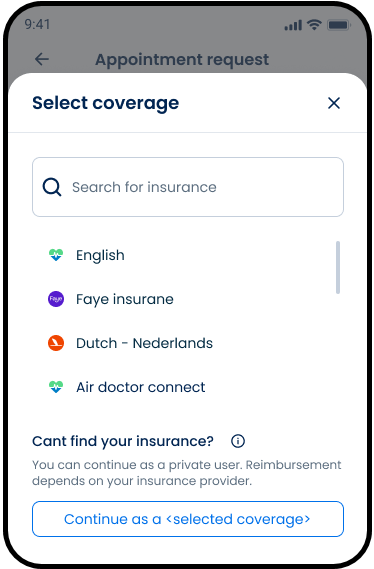
This screen includes:
| # | Element | Description |
|---|---|---|
| 1 | Header | Displays screen title and close action |
| 2 | Search input | Filters coverage providers |
| 3 | Coverage list | Displays available providers |
| 4 | Provider row | Displays provider name and logo |
| 5 | Scroll indicator | Indicates additional providers |
| 6 | Private user section | Displays private-pay option |
| 7 | Continue as private user action | Switches the session to private-pay mode |
| 8 | Close action | Dismisses the screen |
Entry Points
The SDK presents the Select Coverage screen from the following flows:
| Screen | Trigger |
|---|---|
| Home | Select Policy |
| Account → My Coverage | Select an existing policy |
Workflow
- Open the coverage selector.
- Render available providers.
- Filter providers when search input changes.
- Select a provider.
- Submit the selected policy.
- Update the active coverage state.
- Refresh coverage-dependent UI.
Validations
| Scenario | App Behavior | SDK Output |
|---|---|---|
| No policy selected | Disable confirmation | state = unchanged |
| Policy inactive | Display disabled state | policy = inactive |
| Policy unsupported | Display disabled state | policy = unsupported |
| No matching providers | Display private user section | results = empty |
| Private-pay unavailable | Hide private user option | private = unavailable |
| Request in progress | Display loading state | state = loading |
| Request fails | Display error state | state = error |
Actions
| Scenario | App Behavior | SDK Output |
|---|---|---|
| Coverage screen opened | Load providers | PUT /api/v3/coverage |
| Search updated | Filter provider list | results = filtered |
| Provider selected | Update selection state | policy = selected |
| Confirmation selected | Submit policy selection | POST /api/v3/coverage/select |
| Selection succeeds | Update active coverage | policy = active |
| Private user selected | Switch to private-pay mode | coverage = private |
| Screen closed | Preserve current selection | state = unchanged |
Endpoint Resources
Select Coverage
PUT
v3/coverage
Returns the coverage selection screen.
Search Companies
PATCH
v3/coverage/add/search
Updates companies list with companies that match searched company name.
Select Policy
POST
v3/coverage/select
Changes patient's current policy to selected one.