Remove Coverage
Use Remove Coverage to unlink a policy from the patient account.
Policy removal does not delete the policy record.
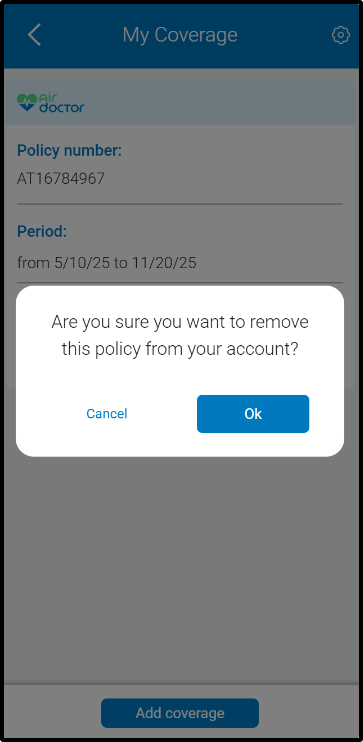
This screen includes:
| # | Element | Description |
|---|---|---|
| 1 | Header | Displays modal title and close action |
| 2 | Confirmation message | Displays removal confirmation text |
| 3 | Remove action | Confirms policy removal |
| 4 | Cancel action | Dismisses the modal |
| 5 | Policy card | Displays policy details behind the modal |
Workflow
- Open Account → My Coverage.
- Select Remove Policy.
- Review the confirmation message.
- Confirm or cancel removal.
- Refresh the coverage list.
Post-Removal Behavior
| Scenario | Behavior |
|---|---|
| Removal succeeds | Mark policy as removed |
| Policy removed | Keep policy visible in the list |
| Removed policy selected | Block booking and coverage resolution |
Validations
| Scenario | App Behavior | SDK Output |
|---|---|---|
| Policy active | Enable remove action | policy = removable |
| Policy already removed | Disable remove action | policy = removed |
| Removal canceled | Close modal | state = unchanged |
| Removal rejected | Display error state | state = error |
Actions
| Scenario | App Behavior | SDK Output |
|---|---|---|
| Remove Policy selected | Open confirmation modal | PUT /api/v3/policies/delete |
| Removal confirmed | Submit removal request | POST /api/v3/policies/delete |
| Removal succeeds | Update policy state | policy = removed |
| Removal fails | Preserve policy state | state = unchanged |
| Cancel selected | Dismiss modal | state = unchanged |
| Add coverage selected | Open add coverage flow | navigation = add_coverage |
Endpoint Resources
Remove Policy Confirmation
PUT
/policies/delete
Returns the confirmation popup configuration for removing a policy.
Remove Policy
POST
v3/policies/delete
Removes an insurance policy from the user’s coverage by canceling it.