Add New Coverage
Use Add New Coverage to create and link a new insurance policy.
Required fields and insurer-specific validation rules derive from the coverage configuration response.
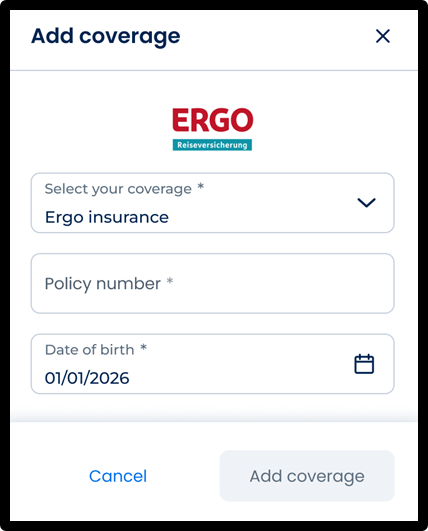
This screen includes:
| # | Element | Description |
|---|---|---|
| 1 | Header | Displays screen title and close action |
| 2 | Insurer selector | Selects the insurance provider |
| 3 | Policy number field | Updates the policy identifier |
| 4 | Dynamic form fields | Displays insurer-specific required fields |
| 5 | Date field | Updates date-based identifiers when required |
| 6 | Validation message | Displays invalid or missing field errors |
| 7 | Add coverage action | Submits coverage details |
| 8 | Cancel action | Dismisses the screen |
Workflow
- Open Add New Coverage.
- Render insurer-specific fields.
- Select or update the insurer.
- Refresh required fields when insurer changes.
- Enter required policy information.
- Validate field values.
- Submit coverage details.
- Link the policy to the active account.
- Update the active coverage state when applicable.
Validations
| Scenario | App Behavior | SDK Output |
|---|---|---|
| Required field missing | Block submission | error = required_field |
| Policy number invalid | Display validation error | error = invalid_policy |
| Identifier invalid | Display validation error | error = invalid_identifier |
| Date invalid | Display validation error | error = invalid_date |
| Insurer updated | Refresh required fields | fields = updated |
| Coverage unsupported | Display error state | coverage = unsupported |
| Validation fails | Preserve editable state | state = error |
| Request in progress | Display loading state | state = loading |
Actions
| Scenario | App Behavior | SDK Output |
|---|---|---|
| Add New Coverage opened | Load coverage form | PUT /api/v3/coverage/add |
| Insurer changed | Refresh insurer fields | PATCH /api/v3/coverage/add/new-coverage/change-company |
| Field updated | Update form state | form = updated |
| Add coverage selected | Submit coverage request | POST /api/v3/coverage/add/new-coverage |
| Coverage created | Link active policy | coverage = linked |
| Coverage activated | Refresh coverage context | coverage = active |
| Submission rejected | Display validation errors | state = error |
| Cancel selected | Dismiss screen | state = unchanged |
Endpoint Resources
Add Coverage
PUT
v3/coverage/add
Displays add coverage screen.
Proceed Add New Coverage
POST
v3/coverage/add/new-coverage
Assigns patient to specified policy.