Focus Policies
Use Focus Policies to resolve and maintain the active policy when multiple policies exist under the same company.
The platform returns a resolved state based on the selected patient and applicable policy rules.
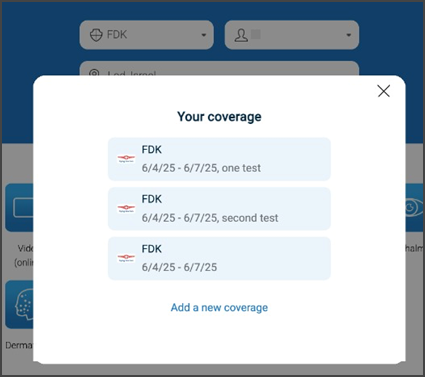
This screen includes:
- Coverage list displaying all available policies for the selected company.
- Policy cards with provider name, coverage dates, and optional description.
- Scrollable container when multiple policies exist.
- Selection state that determines the active policy in focus.
- Add a new coverage action to create an additional policy.
- Close control (X) to dismiss the modal and return to the previous screen.
Policy Resolution Rules
The platform resolves the active policy based on eligibility and date constraints.
Active policy criteria
A policy is considered active when:
- Valid on the current date.
- Valid on the next day.
- Valid on the following day.
Only active policies are included in focus resolution.
Workflow
- Request policies for the selected company.
- The platform returns eligible policies and a unified patient list.
- Render the patient selector.
- If duplicate names exist, display disambiguated labels.
- Select a patient.
- The platform resolves and returns the active policy.
- Update the UI to reflect the selected patient and active policy.
Duplicate Patient Handling
When duplicate patient names exist:
- The platform returns patient entries with associated policy identifiers.
- The client displays disambiguated labels using the last four characters of the policy number.
Example:
John Doe (1234)
Validations
These rules define policy selection constraints.
| Condition | App behavior | SDK output |
|---|---|---|
| Multiple active policies under the same company. | Display patients from all eligible policies. | Response with aggregated patient list. |
| No active policies available. | Display empty or disabled selector. | Empty state response. |
| Duplicate patient names exist. | Display disambiguated labels. | Patient list with identifiers. |
| Selected patient does not match any active policy. | Block selection. | Validation error indicating no matching policy. |
| Only one active policy exists. | Display patients from a single policy. | Response with single-policy mapping. |
Actions
These actions define focus updates and state transitions.
| Condition | App behavior | SDK output |
|---|---|---|
| Load selector. | Render patient list. | Response with patient list and policy mapping. |
| Select a patient. | Update selection state. | Response with resolved active policy. |
| Select duplicate entry. | Resolve using policy identifier. | Response with correct policy association. |
| Change selection. | Update focus state. | Response with updated selection and policy. |
| Policy eligibility changes. | Refresh selector. | Updated response with filtered policies. |
Endpoint Resources
Focus policies
PATCH
v3/about-us
Focuses the last policies button and triggers the Terms & policies action.