Edit Request
Use Edit Request to update editable appointment fields based on the current appointment state.
Editable sections may include:
-
Medical issue
-
Contact information
-
Attachments
-
Payment method (when required)
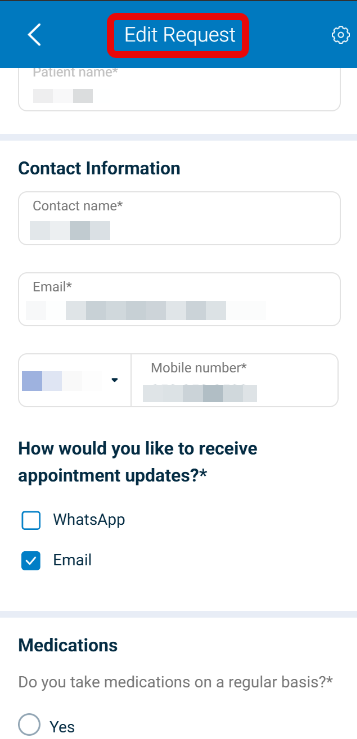
This screen includes:
- Contact fields (email and phone).
- Medical issue field with optional attachments.
- Payment update link (when required).
- Update primary action.
Field availability derives from appointment state flags returned in the page model.
If no modified values exist, no update request is submitted and state remains unchanged.
Workflow
- Open Appointment Details.
- Select Edit request.
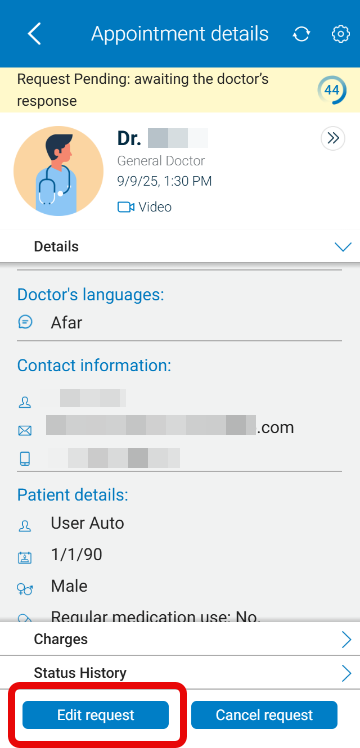
- The app evaluates appointment state.
- Editable fields render according to state flags.
- Modify one or more editable fields.
- Select Update.
Validations
| Condition | Rendering Rule |
|---|---|
Appointment state = Requested | Enable date and time fields. |
Appointment state = Scheduled | Render date and time as read-only. |
| Payment modification required flag = true | Render payment update section. |
| Payment modification required flag = false | Omit payment update section. |
| Invalid email format | Block update. Return field validation error. |
| Invalid phone format | Block update. Return field validation error. |
| Medical issue exceeds maximum length | Block update. Return validation error. |
| No modified fields detected | Do not submit update request. |
Actions
| Trigger | Result |
|---|---|
| Editable field modified | Mark request as changed. |
| Update selected (changes exist) | Submit update request. |
| Update selected (no changes) | No state change. |
| Date or time modified | Provider notification flag included in update set. |
| Contact or medical issue modified | Provider notification flag included in update set. |
| Payment modified only | Update set excludes provider notification flag. |
| Update succeeds | Apply returned update set and navigate to details view. |
| Update rejected | No state change. Display error. |
Endpoint Resources
Wizard for Edit
PUT
v3/wizard/edit
Return wizard screen for editing or rescheduling an existing appointment.
Patch Search Address
PATCH
v3/wizard/addresses/search
Search address suggestions for home visit using autocomplete.
Patch Fill Address
PATCH
v3/wizard/addresses/select
Select a suggested address by maps location ID and fill wizard address fields.
Stripe Patch Proxy
PATCH
v3/wizard/appointments/checkout
Perform minimal booking or checkout action payload for Stripe proxy flow.
Patch Medications
PATCH
v3/wizard/update/medications
Update the medications section of the wizard.
Update Appointment
POST
v3/wizard/appointments/update
Update an existing appointment using wizard data; expect a 204 response with no response body.