Select appointment Date, Time, and Location
The Select Date, Time, and Location screen allows the user to choose the appointment date, time, and visit location.
The screen renders provider availability returned from the SDK. The primary action remains disabled until the user completes the required selections in order.
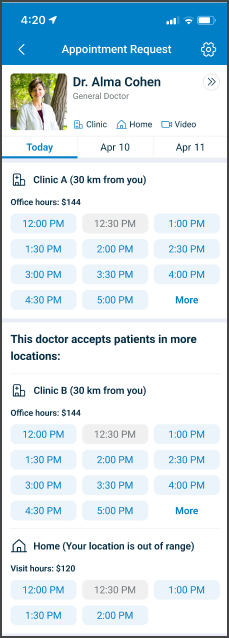
This screen includes:
-
Header and provider details
- Header titled Appointment Request with navigation controls.
- Doctor card with provider name, specialty, and supported appointment types.
-
Date and location selection
- Date selector with available dates.
- One or more location sections with location name, distance, visit type, and fee.
-
Time availability
- Time slot buttons grouped by location.
- Disabled time slots for unavailable times.
- More option that expands the time slot list.
- Informational note when additional locations exist.
- Disabled visit options when a location is out of range.
Workflow
This screen follows the appointment request flow after provider selection.
- Review available provider details.
- Select a date.
- Select a location.
- Select a time slot.
- Continue to the next step.
Appointment Types
Appointment type icons indicate supported visit modes.
- Clinic
- Home
- Video
Behavior
- Display icons on the doctor card.
- Display icons on each location.
- Keep icons visible during selection.
Required Information Behavior
Some locations require additional patient information for scheduling.
This screen does not collect that information.
Behavior
- Allow selection without additional required-information input.
- Collect required information in a later step.
- Display only fields required for the selected location.
Validations
The SDK enforces validation states before enabling the primary action.
| Scenario | App behavior | SDK output |
|---|---|---|
| No date selected. | Primary action remains disabled. | primaryAction.enabled = false. |
| No location selected. | Primary action remains disabled. | Missing location validation state. |
| No time slot selected. | Primary action remains disabled. | Missing time slot validation state. |
| Time slot unavailable. | Slot renders disabled. Selection remains blocked. | slot.enabled = false. |
| Location out of range. | Location renders disabled. Selection remains blocked. | location.enabled = false. |
| Availability changes. | Availability refreshes. | Update set with refreshed dates, locations, or slots. |
Actions
| Scenario | App behavior | SDK output |
|---|---|---|
| Date selected. | Locations and slots refresh for the selected date. | Update set scoped to the selected date. |
| Location selected. | Slot list filters for the selected location. | Update set scoped to the selected location. |
| Time slot selected. | Primary action becomes enabled. | primaryAction.enabled = true. |
| More selected. | Additional slots render. | Update set with expanded slot list. |
| Back selected. | Previous step opens. | Navigation instruction in response. |