Clinic Details
Use Clinic Details to display clinic availability, working hours, and location information.
Displayed sections derive from the selected clinic and current booking context.
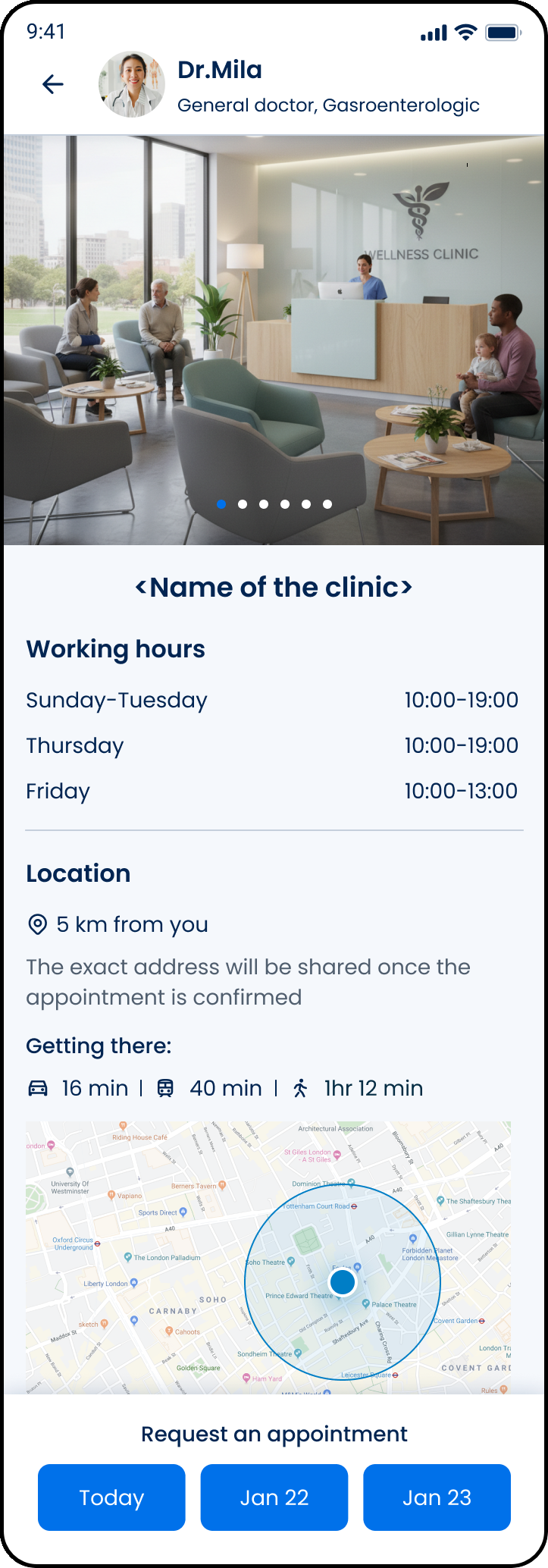
This screen includes:
| # | Element | Description |
|---|---|---|
| 1 | Date selector | Displays available booking dates |
| 2 | Working hours | Displays daily opening hours |
| 3 | Location section | Displays clinic location information |
| 4 | Privacy notice | Displays when the exact address is restricted |
| 5 | Map preview | Displays clinic area when coordinates exist |
| 6 | Back action | Returns to the previous screen |
Workflow
- Open clinic details from Doctor Details or a clinic list.
- Request clinic details.
- Render availability, working hours, and location data.
- Select an available date when supported.
- Continue the booking flow
Validations
| Scenario | App Behavior | SDK Output |
|---|---|---|
| Session valid | Render clinic details | state = loaded |
| Session invalid | Block access | state = unauthenticated |
clinicId valid | Display clinic information | clinic = available |
clinicId invalid | Display error state | error = invalid_clinic |
| Availability exists | Enable date selection | availability = available |
| Availability unavailable | Disable booking selection | availability = empty |
| Selected date valid | Enable continuation | date = valid |
| Selected date invalid | Block selection | error = invalid_date |
| Working hours available | Display working hours | hours = available |
| Working hours unavailable | Hide working hours | hours = unavailable |
| Coordinates available | Display map preview | map = available |
| Coordinates unavailable | Hide map preview | map = unavailable |
| Address restricted | Display privacy notice | address = restricted |
Actions
| Scenario | App Behavior | SDK Output |
|---|---|---|
| Screen opened | Load clinic details | PUT /api/v3/clinic-details |
| Date selected | Update selected availability | date = selected |
| Map rendered | Center map on clinic area | map = rendered |
| Booking selected | Continue booking flow | navigation = booking |
| Back selected | Return to previous screen | navigation = back |
| Request rejected | Display error state | state = error |
Endpoint Resources
Clinic
PUT
v3/clinic-details
Opens the clinic details screen.