Request Reset Password
Use the Request Reset Password screen to start the password recovery process.
Users access this screen from the Sign In screen by selecting Forgot password.
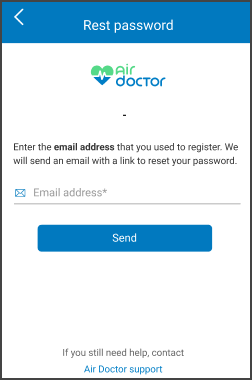
This screen includes:
| # | Element | Description |
|---|---|---|
| 1 | Header | Displays Reset password title and close control |
| 2 | Instruction text | Explains which email address the user must enter |
| 3 | Email input field | Required email address input |
| 4 | Support link | Opens Contact support |
| 5 | Primary action | Submits the reset password request |
Workflow
- Open the Sign In screen.
- Select Forgot password.
- Open the Reset Password Request screen.
- Confirm or edit the email address.
- Select Reset password.
- Display the Email Sent Confirmation screen.
Validations
| Scenario | App Behavior | SDK Output |
|---|---|---|
| Email field empty | Disable Reset password | validation = required |
| Email format invalid | Display inline error | error = invalid_email |
| Email format valid | Enable Reset password | validation = valid |
| Request in progress | Show loading state | state = loading |
| Request succeeds | Display confirmation screen | state = email_sent |
| Network failure | Display error | error = network |
Actions
| Scenario | App Behavior | SDK Output |
|---|---|---|
| Email entered | Update input state | email = updated |
| Reset password selected | Submit reset password request | Request triggered |
| Request succeeds | Open confirmation screen | state = email_sent |
| Support selected | Open support page | External navigation |
Endpoint Resources
Request Reset Password
PUT
v3/account/password/reset/request
Returns the Reset Password Request screen configuration.
UI Element Types
| Level | Reference | Type | Value | Placement |
|---|---|---|---|---|
| 1 | header | Toolbar | Reset password | — |
| 1 | close | Action | Close | right |
| 1 | reset-instructions | Regular | Enter the email address that you used to create the account. | ^ |
| 1 | email | Input | Email address * | — |
| 1 | spacer | Spacer | — | — |
| 1 | need-help | Regular | Need help? | ^ |
| 1 | support | Link | Contact support | ^ |
| 1 | primary-action | Button | Reset password | bottom |