Change Password
Use the Change Password screen to update the authenticated user's password.
This screen requires an active session.
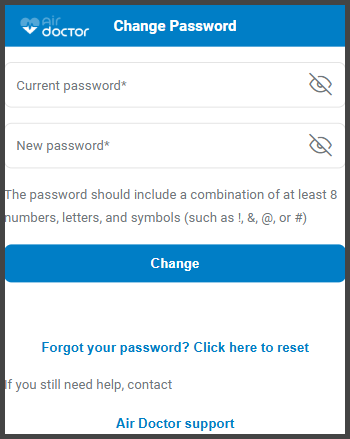
This screen includes:
| # | Element | Description |
|---|---|---|
| 1 | Dialog title | Displays Change password |
| 2 | Close action | Dismisses the dialog |
| 3 | Current password field | Required input with visibility toggle |
| 4 | New password field | Required input with visibility toggle |
| 5 | Password requirements | Lists the required password rules |
| 6 | Forgot password link | Opens the reset password flow |
| 7 | Cancel action | Closes the dialog without changes |
| 8 | Update password action | Submits the password update |
Workflow
- Open Account.
- Select Edit account.
- Select Change password.
- Enter the current password.
- Enter a new password that meets the password requirements.
- Select Update password.
Password reset entry
If the user cannot provide the current password:
- Select Forgot password?.
- Continue in the Reset Password flow.
Validations
| Scenario | App Behavior | SDK Output |
|---|---|---|
| Session missing or expired | Block access and require sign in | state = unauthenticated |
| Current password empty | Disable Update password | validation = required |
| New password empty or invalid | Disable Update password and show requirement state | validation = invalid |
| Current password incorrect | Display inline error | error = invalid_current_password |
| Request in progress | Show loading state | state = loading |
| Request blocked | Display restriction message | HTTP 405 |
Actions
| Scenario | App Behavior | SDK Output |
|---|---|---|
| Current password updated | Update input state | currentPassword = updated |
| New password updated | Update input state | newPassword = updated |
| Visibility toggle selected | Toggle password visibility | passwordVisible = true/false |
| Update password selected | Submit password update | Password change request triggered |
| Password update succeeds | Keep session active and close dialog | state = password_updated |
| Forgot password selected | Open the Reset Password flow | Navigation event |
| Cancel selected | Close dialog without changes | No state change |
| Close selected | Dismiss dialog | No state change |
Endpoint Resources
Change Password
PUT
v3/account/password/change
Returns the Change Password screen configuration for an authenticated user.
UI Element Types
| Level | Reference | Type | Description | Placement |
|---|---|---|---|---|
| 1 | title | Regular | Displays Change password | header |
| 1 | close | Action | Dismisses the dialog | header |
| 1 | current-password | Password | Current password input field | body |
| 1 | new-password | Password | New password input field | body |
| 1 | password-rules | Regular | Password requirement hint | body |
| 1 | reset-password | Link | Opens the reset password flow | body |
| 1 | cancel | Button | Closes the dialog without changes | footer |
| 1 | update-password | Button | Submits the password update | footer |
Check Password Strength
PATCH
v3/account/password/check-strength
Checks the new password strength and updates the password requirement hints.
Accept Change Password
POST
v3/account/password/change
Updates the authenticated user's password after verifying the current password.