Settings
Use the Settings screen to configure personal preferences such as language, currency, distance units, and accessibility options.
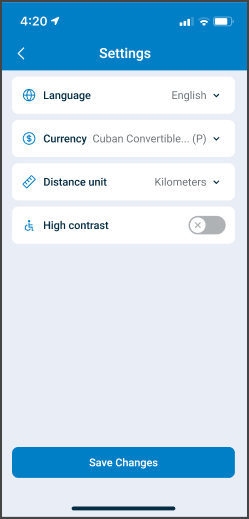
This screen includes:
- A Language selector that displays the current language and opens a language list.
- A Currency selector that displays the current currency and opens a currency list.
- A Distance unit selector that switches between kilometers and miles.
- A High contrast toggle to enable or disable accessibility styling.
- A Save Changes action that applies selected preference updates.
Workflow
This sequence describes how a user configures preferences from the Settings screen.
- Open the Account screen.
- Select Settings.
- Review the current values for Language, Currency, Distance unit, and High contrast.
- Select a setting such as Language, Currency, or Distance unit.
- Select a value from the list and select Save Changes.
- The app applies the updated preferences.
Validations
These scenarios describe how the app validates settings input and state.
| Scenario | App Behavior | SDK Output |
|---|---|---|
| A language value changes. | The app updates localization state. | Localization preference updates. |
| A currency value changes. | The app updates currency preference. | Currency preference updates. |
| A distance unit value changes. | The app switches between kilometers and miles. | Measurement preference updates. |
| High contrast is enabled or disabled. | The app applies accessibility styling. | Accessibility state updates. |
Actions
These scenarios describe how the app responds to user actions and what integrators can expect from the SDK.
| Scenario | App Behavior | SDK Output | Integration Notes |
|---|---|---|---|
| The user selects Language. | The app displays the language selection list. | Returns a selection page object. | Language options depend on enabled locales. |
| The user selects Currency. | The app displays the currency selection list. | Returns a selection page object. | Currency list depends on configuration. |
| The user selects Distance unit. | The app updates the distance unit preference. | Updates measurement state. | Applies across distance-based screens. |
| The user toggles High contrast. | The app updates accessibility styling. | Updates accessibility state. | Applies immediately after save. |
| The user selects Save Changes. | The app applies all selected changes. | No response body or update set, depending on endpoint used. | Preference persistence depends on integration level. |
Endpoint Resources
Settings
PUT
/settings
Produces the Settings screen for the current user profile.
Returns a structured page that follows the internal Put Response Format and defines all configurable user preferences.
Change Distance Unit
PATCH
/settings/change-distance-unit
Changes the selected distance unit for the current user.
Returns an update set that refreshes distance-based values on the currently open page and follows the internal Patch Response Format.
Update User Preferences
POST
/settings/update-preferences
Updates the current user’s preference settings, including language, currency, and distance unit.
This endpoint applies the changes immediately and returns no response body on success.