Log Out
The Log out confirmation screen ends the active user session.
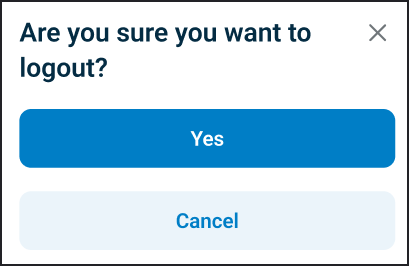
This screen includes:
| # | Element | Description |
|---|---|---|
| 1 | Dialog title | Displays Log out |
| 2 | Close action | Dismisses the dialog and keeps the session active |
| 3 | Confirmation message | Asks the user to confirm log out |
| 4 | Log out action | Ends the active session |
Workflow
- Open Account.
- Select Log out.
- Review the confirmation dialog.
- Select Log out to end the session, or close the dialog to remain signed in.
Validations
| Scenario | App Behavior | SDK Output |
|---|---|---|
| No active session | Ignore log out action or display Sign in screen | state = unauthenticated |
| Active session exists | Display confirmation dialog | state = logout_pending |
| Request in progress | Show loading state | state = loading |
Actions
| Scenario | App Behavior | SDK Output |
|---|---|---|
| Log out selected from Account | Open confirmation dialog | state = logout_pending |
| Log out selected in dialog | End session and clear token | state = loggedOut |
| Close selected | Dismiss dialog and keep session active | state = active |
Endpoint Resources
Logout Confirmation
PUT
v3/account/logout
Returns the log out confirmation screen configuration for the active session.
Logout
POST
v3/account/logout
Ends the authenticated user session and revokes active access tokens.