Appointment List
Use the Appointment List screen to review appointments linked to a doctor profile. The screen separates current and previous appointments and provides filter, refresh, export, and navigation actions.
The SDK returns appointment cards in the required display order. Render the cards in the order received.
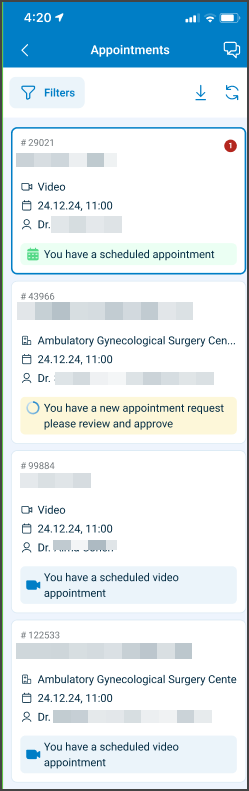
This screen includes:
| # | Element | Description |
|---|---|---|
| 1 | Current section | Displays active and upcoming appointments |
| 2 | History section | Displays previous appointments |
| 3 | Filter action | Opens status and date range filters |
| 4 | Refresh action | Requests the latest appointment data |
| 5 | Download action | Exports appointment data as an .xlsx file |
| 6 | Appointment card | Displays patient, visit, date, time, and status information |
| 7 | Patient details | Displays the patient name and date of birth |
| 8 | Visit details | Displays the visit type, date, and time |
| 9 | Doctor name | Displays the doctor name when the profile provides access to multiple doctors |
| 10 | Status indicator | Displays the appointment status |
| 11 | Unread message count | Displays the number of unread messages for the appointment |
| 12 | Account action | Opens the doctor account details |
Workflow
View Appointments
- Open the Welcome screen.
- Select Manage Appointments.
- Review appointments in the Current or History section.
- Scroll to request additional appointments when more records exist.
- Select an appointment card.
- Open Appointment Details.
Filter Appointments
- Select Filter.
- Select one or more appointment statuses.
- Set a date range when required.
- Select Apply filters.
- Review the matching appointments.
Refresh Appointments
- Select Refresh.
- Request the latest appointment data.
- Replace or update the affected appointment cards.
- Preserve the server-defined sort order.
Download Appointments
- Select Download.
- Request the appointment report.
- Receive the report as an
.xlsxfile.
Display Variants
| Variant | Behavior |
|---|---|
| Mobile | Opens the appointment list as a full-screen page |
| Desktop | Opens the appointment list in the welcome-or-details panel |
Sort Order
The service defines the appointment order. The client must not apply a separate sort rule.
1. Unread Messages
Appointments with unread incoming messages appear first.
This rule applies only to the doctor view. The service evaluates unread messages across all revisions of an appointment and orders appointments by the latest unread message timestamp.
2. Appointment Status
The service applies the following status priority:
| Priority | Status |
|---|---|
| 1 | PROPOSED, REQUESTED, ALTERNATIVE_OFFERED, CS_OFFER |
| 2 | APPOINTMENT_SCHEDULED |
| 3 | All other statuses |
3. Scheduled Time
When appointments have equal message and status priority, the most recent scheduled appointment appears first.
Validations
| Scenario | App behavior | SDK output |
|---|---|---|
| Filter set has no values | Disable Apply filters | state = invalid |
| Additional appointments do not exist | Preserve the current list | state = complete |
| Appointment card lacks required data | Block the invalid card or page | error = schema_validation |
| Appointment status value is unsupported | Block the invalid status indicator | error = invalid_status |
| Status indicator color is unsupported | Block the invalid card | error = invalid_color |
| Export request exceeds the allowed limit | Block the download and display an error | error = export_limit_exceeded |
| List request fails | Preserve the current screen and display an error | state = error |
| Session is invalid | Block access to appointment data | state = unauthenticated |
Actions
| Scenario | App behavior | SDK output |
|---|---|---|
| Current selected | Display current appointments | section = current |
| History selected | Display previous appointments | section = history |
| Filter selected | Open appointment filters | Navigation event |
| Filters applied | Display matching appointments | PATCH update set |
| Refresh selected | Request the latest appointment data | Page object or PATCH update set |
| Scroll threshold reached | Request additional appointment cards | PATCH update set |
| Appointment card selected | Open Appointment Details | Navigation event |
| Download selected | Request the appointment report | Binary .xlsx file |
| Account selected | Open doctor account details | Navigation event |
| List request succeeds | Render appointment cards in the returned order | state = ready |
Endpoint Resources
Donwload Appointments (Excel)
GET
/profile/appointments/all/download.xlsx
Returns an .xlsx file that contains appointment data in a report format.
Appointment List Screen
PUT
/profile/appointments
Produces the Appointment List page for the doctor.
A successful response returns a complete page object that follows the internal Put Response Format and defines the full layout of the appointment list.
| Variant | Behavior | Example |
|---|---|---|
| Mobile variant | Opens as a full-screen view. | 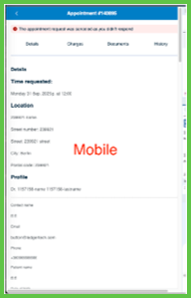 |
| Desktop variant | Loads in the right-hand embed panel (welcome-or-details) of the Appointments screen. | 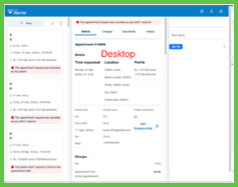 |
UI Element Types
| Level | Reference | Type | Value | Placement |
|---|---|---|---|---|
| M-1 | walk-in | Toolbar | [Walk-in] | |
| M-1 | filter | Toolbar | [Filter] | |
| M-1 | download | Toolbar | [Download] | |
| M-1 | refresh | Toolbar | [Refresh] | |
| M-1 | account-details | Toolbar | [Account] | |
| D-1 | filter | Secondary | Filter | |
| D-1 | spacer | Spacer | — | ~100% |
| D-1 | download | Link | [Download] | ~ |
| D-1 | refresh | Link | [Refresh] | ~ |
| D-1 | appointment-list-scroller | Scroller | ||
| 2 | appointment-card~[appointment-revision-id] | Card | ||
| 3 | patient-full-name | Section | Patient name | |
| 3 | spacer | Spacer | ~ | |
| 3 | count | Count | ~ | |
| 3 | birthday | Extra | Date of birth | |
| 3 | visit-type-date-time | Regular | Type, date, time | |
| 3 | doctor-name | Regular | Doctor name (if multiple doctors accessible) | |
| 3 | appointment-card-status | Red, Blue, Green, Yellow | Appointment status (or Yellow, Red, Blue) |
Get Previous Appointments
PATCH
/profile/appointments/load-more
Returns additional appointment cards as a Patch Response Format update set.
Supports infinite scrolling on mobile and desktop.
Update Appointment List
PATCH
/profile/appointments/update
Updates the appointment list using filters and marker references to refresh the displayed appointment cards.
Returns updates that modify appointment cards, filter values, or internal markers.
The response follows the internal Patch Response Format.