Filter
Use the Appointment Filter screen to define filter criteria and return filtered appointment results. The integrator renders the filter panel and submits the selected filter model.
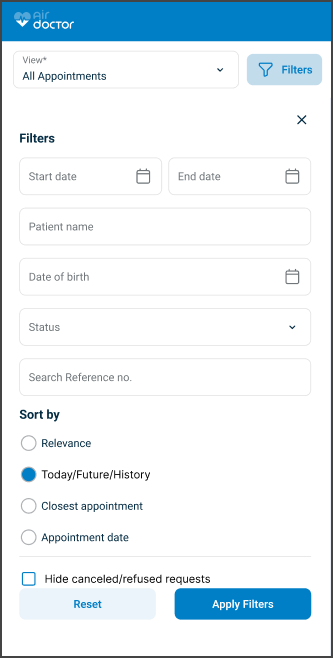
This screen includes:
- Text fields:
- Reference number
- Doctor or clinic
- Patient name
- Date of birth
- A multiselect list for appointment status
- Start date and End date fields
- Apply and Reset actions
- A quick filter bar for common statuses
- An optional sort panel
- Field-level validation
- A Close action
Workflow
This sequence describes how the doctor filters the appointment list.
- Select the Filter icon in the Appointments toolbar.
- Enter one or more filter criteria:
- Reference number (digits only)
- Start date and End date
- Doctor or clinic name
- Patient name
- Date of birth (YYYY-MM-DD)
- Status: New requests, Offered appointments, Scheduled, After visit, Cancelled / Refused
- Select Apply to update the appointment list.
- Review the filtered results.
- Select Reset to clear all values and restore the default list.
Validations
These rules define when the SDK blocks submission or returns validation errors.
| Scenario | App Behavior | SDK Output |
|---|---|---|
| No filter values exist. | Apply remains disabled. | No request submitted. |
| End date occurs before start date. | Highlight date fields and block submission. | Field validation error. |
| Status value is not valid. | Block selection. | Validation error. |
| Date of birth occurs in the future. | Highlight field and block submission. | Validation error. |
| Reference number contains non-digit characters. | Block submission. | Validation error. |
Actions
These actions submit or reset the filter model.
| Scenario | App Behavior | SDK Output |
|---|---|---|
| Select Apply. | Submit the filter model. | Return filtered appointment list. |
| Select Reset. | Clear all fields. | Return default appointment list. |
| Select Close. | Close the panel. | No update. |
| Update multiple fields. | Combine filter criteria. | Return filtered results. |
| Select sort option. | Update result order. | Return sorted results. |
Endpoint Resources
Appointment Filter Screen
PUT
/profile/appointments/filter
Produces the Appointment Filter screen.
A successful response returns a page object that follows the internal Put Response Format and defines the filter panel layout and available field values.
Platform Variants
| Variant | Behavior | Example |
|---|---|---|
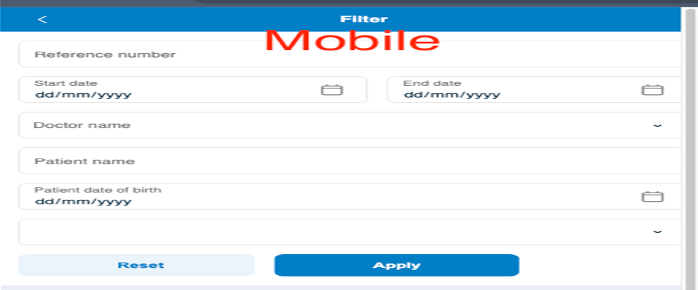
| Mobile | Opens as a full-screen overlay with vertically stacked fields. Tapping outside closes the panel. | (see below) |
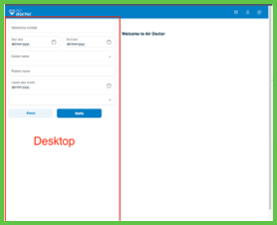
| Desktop | Displays as a left-side panel with compact spacing. Filtering updates the list in real time. | (see below) |
UI Element Types
| Level | Reference | Type | Value | Placement |
|---|---|---|---|---|
| 1 | reference | Edit | Reference no. | |
| 1 | start-date | Date | Start date | |
| 1 | end-date | Date | End date | |
| 1 | profile-id | Combo | Profile name | |
| 1 | patient-name | Edit | Patient name | |
| 1 | patient-birthday | Date | Date of birth | |
| 1 | status-group | Multiselect | Status (values: New requests, Offered appointments, Scheduled appointments, After visit, Cancelled / Refused) | |
| 1 | reset | Secondary | Reset | |
| 1 | apply | Button | Apply Filter | ~ |
Reset Filter
PATCH
/profile/appointments/filter/reset
Resets all filter values to their default state.
A successful response returns an update set that restores the unfiltered appointment list.

Apply Appointment Filter
POST
/profile/appointments/filter
Applies the selected filter criteria and returns the filtered appointments.
Parameters
| Name | Type | Required | Description |
|---|---|---|---|
reference | String | No | Unique appointment reference number. |
start-date | Date | No | Start of the search range. Uses the doctor's time zone. |
end-date | Date | No | End of the search range. Uses the doctor's time zone. |
profile | Integer | No | Unique identifier for the doctor's profile. |
patient-name | String | No | Patient name. |
patient-date-of-birth | Date | No | Patient's date of birth. |
status-group | List<Enum> | No | Appointment status group. Valid values: new-requests, offered-appointments, scheduled-appointments, after_visit, cancelled |
location-type | List<Enum> | No | Visit type. Valid values: home, clinic, video |
Errors
| Code | Description |
|---|---|
FIELDS_VALIDATION_ERROR | One or more required fields are invalid. |