Welcome Screen
Use the Welcome Screen as the initial placeholder in the appointments workspace.
This screen appears only when no appointment is selected and confirms that the doctor has access to the appointment system after login.
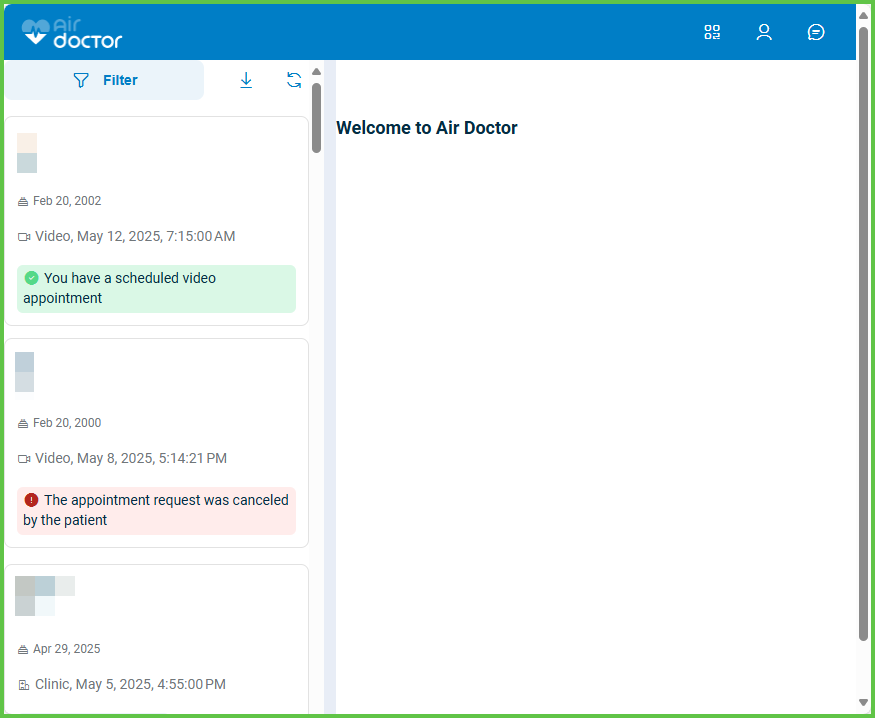
This screen includes:
- A static message: Welcome to Air Doctor
- A two-pane layout:
- Left pane: appointment list
- Right pane: static welcome placeholder (empty state)
- No buttons or interactive elements
- No account or session details
In the desktop flow, the Welcome Screen is different from the Home Screen.
The Welcome Screen is a static right-pane placeholder with no actions, while the Home Screen is a full interactive dashboard that appears right after login.
Workflow
This sequence describes when the Welcome Screen appears.
- The doctor completes login.
- The app loads the Appointment List screen in the left pane.
- The right pane displays the Welcome Screen until the doctor selects an appointment.
Validations
These scenarios describe how the system validates access to the Welcome Screen and what the integrator can expect.
| Scenario | App Behavior | SDK Output |
|---|---|---|
| No appointment is selected. | The app displays the Welcome Screen in the right pane. | Returns the welcome page object. |
| The doctor selects an appointment. | The app replaces the Welcome Screen with Appointment Details. | Emits a navigation event. |
| No authenticated session exists. | The app displays the login screen and does not display the Welcome Screen. | Exposes an unauthenticated state. |
| A page object is invalid or incomplete. | The app displays an error page instead of the Welcome Screen. | Schema validation error. |
Actions
These scenarios describe how the app uses the Welcome Screen.
| Scenario | App Behavior | SDK Output | Integration Notes |
|---|---|---|---|
| No appointment is selected. | The app displays the Welcome Screen in the right pane. | Returns a page object. | Desktop workflow only. |
| The doctor selects an appointment. | The app replaces the placeholder with Appointment Details. | Emits a navigation event. | Partners can observe navigation events at Levels 3–6. |
| The doctor performs actions on the left panel only. | The Welcome Screen remains visible until a selection occurs. | No update set. | The right pane does not update without selection. |
Endpoint Resources
Welcome Screen (Right-Pane Placeholder)
PUT
/profile/appointments/welcome
Produces the Welcome Screen placeholder.
A successful response returns a page object that follows the internal Put Response Format.
This page appears in the right pane until an appointment is selected.
UI Element Types
| Level | Reference | Type | Value | Placement |
|---|---|---|---|---|
| 1 | — | Logo | Air Doctor logo | Top left |
| 1 | — | Panel | Welcome to Air Doctor | Right pane |
| 1 | appointment~n | List | Appointment items | Left panel |
| 1 | filter | Button | Filter | Top left |