Review and Approve
Use the Review and Approve screen to decide how to handle appointment requests.
From this screen, the doctor approves the proposed time, suggests alternatives, or declines the request with a reason.

This screen includes:
- Appointment metadata, including proposed time and participant details.
- A Suggested Scheduling card that appears only after the doctor selects Suggest another alternative. Behavior matches Alternative Offer.
- Action buttons: Approve, Suggest another alternative, and Decline.
- Conditional disclaimers and eligibility warnings.
- Button state rules based on appointment validity and required inputs.
- Automatic closure on success, with an updated status in the *Appointment List
Workflow
- From the Appointment Details screen, open a request that needs a decision.
- Review the proposed date, time, and participant details.
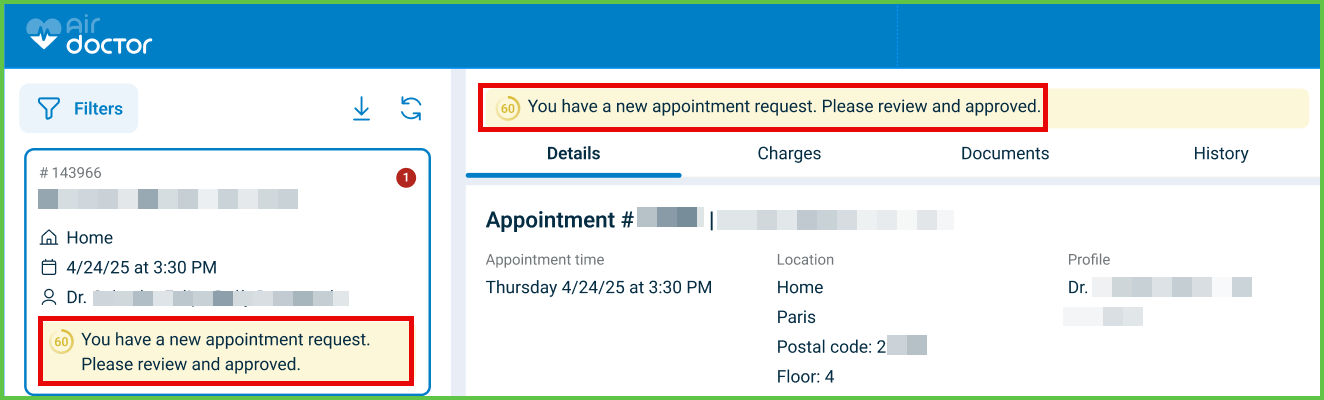
- Select one of these actions:
- Approve confirms the proposed date and time.
- Suggest another alternative opens Suggested Scheduling to propose different times.
- Decline opens a modal that requires a decline reason.
- After submission, the screen closes and the Appointment List reflects the new status.
Validations
These scenarios describe how the app validates the Review and Approve screen.
| Scenario | App Behavior | SDK Output | Example |
|---|---|---|---|
| The appointment status is not eligible for actions (for example, already canceled or completed). | The app disables Approve, Suggest another alternative, and Decline. | Page object with disabled action controls. | |
| The doctor selects Suggest another alternative and no valid date–time combination exists. | The app disables Submit in the Suggested Scheduling card and displays a validation message. | Validation error in the update set; fields stay editable. | |
| The doctor selects Decline without entering a reason. | The app blocks submission and highlights the required reason field. | Validation error for missing required input. | — |
| Coverage or policy rules do not allow approval for the proposed date or profile. | The app displays coverage warnings and blocks approval. | Error such as APPOINTMENT_DATE_NOT_COVERED or FORBIDDEN_DUE_TO_POLICY_TERMS. | — |
| The appointment changes while the doctor views the screen. | The app displays a message and requires a reload before submission. | APPOINTMENT_CHANGED error and updated page payload on reload. | — |
| The system detects invalid or missing data from a third-party source. | The app displays an error state and blocks submission. | THIRD_PARTY_DATA_INVALID error. | — |
Actions
These scenarios describe how the app responds to doctor actions on the Review and Approve screen.
| Scenario | App Behavior | SDK Output | Example |
|---|---|---|---|
| The doctor selects Approve and the appointment is valid. | The app confirms the action, closes the Review and Approve screen, and updates the status in the list. | Update set that sets the approved status and appends a history entry. | |
| The doctor selects Suggest another alternative. | The app opens the Suggested Scheduling card and displays up to three editable alternatives. | Page object that includes the suggested scheduling fragment. | |
| The doctor submits valid alternatives in Suggested Scheduling. | The app submits the suggestion, closes the screen, and sets a pending-response status. | Update set that records suggested times and status change. | — |
| The doctor selects Decline and provides a valid reason. | The app submits the decline decision, closes the screen, and sets a declined status. | Update set that records the decline reason and status change. | — |
A disclaimer appears and disclaimer-displayed is required. | The app requires acknowledgement before Approve or Submit becomes available. | Update set that records disclaimer acknowledgement. | — |
Suggested Scheduling Validator
Use these rules to ensure alternative proposals meet system requirements.
For the full layout and reusable rules, see Suggested Scheduling.
| Validation Rule | Behavior |
|---|---|
| Requires at least one date & time | Rejects empty or invalid input and keeps Submit disabled. |
| Maximum of three alternatives | Rejects attempts to add a fourth time block. |
| Cannot overlap existing times | Highlights overlap and disables submission until conflicts resolve. |
| Enforces minimum lead time | Requires at least 2 hours from the current time. |
| Enforces doctor availability window | Accepts proposals only within configured work hours. |
| Requires timezone confirmation | Displays the timezone selector when the profile has no timezone set. |
| Displays warning for low coverage | Shows a coverage warning when the suggestion creates out-of-network risk. |
The Suggested Scheduling component enables doctors to propose up to three alternative appointment options. It appears within multiple flows, including:
Behavior and Layout
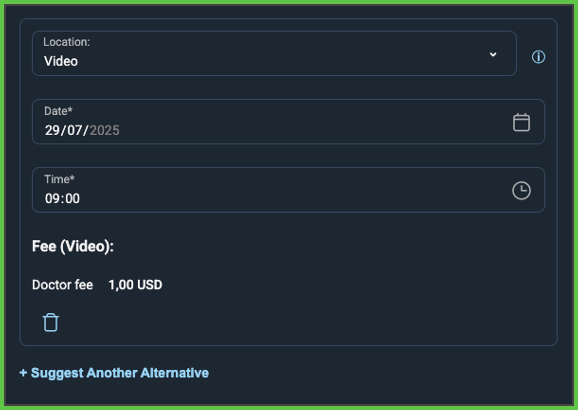
- Displays up to three cards with editable fields:
- Doctor
- Location
- Date
- Time
- Highlights changed fields in red
- Calculates and displays:
- Total fee
- Doctor fee
- Includes a trash icon on cards 2 and 3 for deletion
- Disables Approve until all cards are complete and valid
- Prevents exact duplicates (same doctor, date, time, location)
Workflow
- User selects + Suggest Another Alternative.
- System adds a new card with prefilled doctor and location.
- User enters date and time.
- System validates required fields and checks for duplicates.
- Valid entries enable approval and update controls.
Validations
- Date and time fields must not be empty.
- Offers must differ in at least one value.
- Maximum of three offers allowed.
- Inputs must match expected formats.
- Fee displays only after required fields are complete.
Actions
- Approve: Sends valid offers to the patient and updates status to 5 or 9.
- Delete: Removes the selected offer unless it is the only one.
- Cancel: Discards changes and exits the screen.
- If an offer exactly matches the original request, the system auto-approves it.
SDK Reference
| Level | Reference | Type | Value | Placement |
|---|---|---|---|---|
| 1 | doctor~{x} | Combo | Doctor selector | Main card |
| 1 | location~{x} | Combo | Location selector | Main card |
| 1 | prescription-info~{x} | Link | Prescription warning (if needed) | Inline |
| 1 | date~{x} | Date | Appointment date | Main card |
| 1 | time~{x} | Time | Appointment time | Main card |
| 1 | fee-text~{x} | Section | Total fee display | Summary |
| 1 | doctor-fee-text~{x} | Regular | Doctor fee label | Summary |
| 1 | doctor-fee~{x} | Highlight | Doctor fee value | Summary |
| 1 | delete~{x} | Link | Trash icon | Card 2/3 |
API Reference
API specifications will be added once available.
Endpoint Resources
Review and Approve Screen
PUT
/profile/appointments/{appointment-id}/approve
Produces the Review and Approve page for the specified appointment.
UI Element Types
| Level | Reference | Type | Label | Placement |
|---|---|---|---|---|
| 1 | alternative-{1} | Card | Suggested Scheduling | — |
| 1 | another-alternative | Link | Suggest another alternative | — |
| 1 | spacer | Spacer | — | — |
| 1 | approve | Button | Approve | — |
Add Alternative Panel
PATCH
/profile/appointments/{appointment-id}/approve/add-alternative
Returns an update set that adds an alternative suggestion card.
Approve
POST
/profile/appointments/{appointment-id}/approve
Submits the doctor decision for the appointment.
The endpoint validates input, applies policy and authorization rules, updates appointment status, triggers notifications, and records the action for audit and compliance.
Parameters
| Name | Type | Required | Description |
|---|---|---|---|
disclaimer-displayed | Boolean | No | Controls whether a disclaimer message is displayed during approval. |
location~{n} | int | Yes | Unique identifier for the location (used in each alternative). |
profile~{n} | int | Yes | Unique identifier for the doctor (used in each alternative). |
date~{n} | Date | Yes | Date of the appointment (used in each alternative). |
time~{n} | Time | Yes | Time of the appointment (used in each alternative). |
Errors
| Code | Description |
|---|---|
APPOINTMENT_CHANGED | The appointment changed and must be reloaded. |
APPOINTMENT_DATE_NOT_COVERED | The proposed date is not covered by policy terms. |
FORBIDDEN_DUE_TO_POLICY_TERMS | Policy restrictions prevent approval of this appointment. |
THIRD_PARTY_DATA_INVALID | External data is missing or malformed. |
FIELDS_VALIDATION_ERROR | One or more required fields are missing or invalid. |