Prescription
Use the Prescription Message screen to notify the doctor when prescribing is not permitted in the patient’s current location.
This screen enforces regulatory compliance and blocks all prescription actions.
It appears automatically during a consultation or when the doctor initiates a prescription.
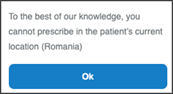
This screen includes:
- A compliance notice indicating that the doctor cannot prescribe in the patient’s current location.
- Appointment summary details including:
- Doctor name and visit type.
- Location (for example, Online doctor).
- Date and time.
- Fee breakdown for the selected visit, including total fee and doctor fee.
- A primary Approve button that allows continuation despite prescription restrictions.
- A close (X) control to dismiss the dialog.
- Conditional visibility triggered by backend prescription eligibility checks.
Workflow
- The doctor starts a consultation or initiates a prescription.
- The backend evaluates the patient’s geographic location.
- If the region restricts prescribing, the app displays this screen immediately.
- The doctor selects Ok to confirm.
- The app returns to the active session without enabling prescription actions.
Validations
These scenarios describe how the app validates conditions that require the Prescription Message screen.
| Scenario | App Behavior | SDK Output | Example |
|---|---|---|---|
| The patient’s region blocks prescribing. | The app displays the restriction message and blocks prescription controls. | Page object containing the prescription message fragment. | |
| The doctor attempts to prescribe despite restrictions. | The app prevents the action and keeps the message visible. | No-op update; prescribing remains disabled. | — |
| The restriction does not apply. | The app continues the prescription workflow normally. | Page object with standard prescribing components. | — |
Actions
These scenarios describe how the app processes doctor actions in the Prescription Message screen.
| Scenario | App Behavior | SDK Output | Example |
|---|---|---|---|
| The doctor selects Ok. | The app records acknowledgment and returns to the active consultation. | Update set confirming dismissal. | |
| The doctor attempts to retry prescribing immediately. | The app displays the restriction again if the patient’s location still blocks prescribing. | Page object with the restriction message. | — |
Endpoint Resources
Prescription Message
PUT
/appointments/{appointment-id}/video-room/prescription
Produces the Prescription Message page when the doctor is not authorized to prescribe in the patient's current location.
The response includes:
- A static restriction message
- A single acknowledgment action (Ok)
- A fully blocked prescription state
UI Element Types
| Level | Reference | Type | Value | Placement |
|---|---|---|---|---|
| 1 | prescription | Regular | To the best of our knowledge, you cannot prescribe in the patient’s current location. | — |
| 1 | ok | Button | Ok | — |
Prescription Message
PUT
/profile/appointments/{appointment-id}/approve/prescription
Displays prescription restrictions for the appointment. The screen appears when prescribing is not permitted based on the patient’s current location.