Approve Disclaimer
Use Approve Disclaimer to present a disclaimer that the doctor must acknowledge during the appointment approval flow.
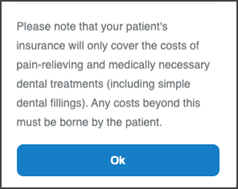
This screen includes:
| # | Element | Description |
|---|---|---|
| 1 | Disclaimer message | Displays the applicable disclaimer |
| 2 | Ok action | Confirms the disclaimer |
Workflow
- Open an appointment that requires approval.
- Determine that a disclaimer applies.
- Call
PUT /api/v3/profile/appointments/{appointment-id}/approve/disclaimer. - Display the Approve Disclaimer screen.
- Review the disclaimer.
- Select Ok.
- Continue the approval flow.
Validations
| Scenario | App behavior | SDK output |
|---|---|---|
| Disclaimer applies | Display the disclaimer screen | Page object |
| Disclaimer does not apply | Continue the approval flow | No disclaimer page |
Request returns 200 | Render the returned page | Page object |
Request returns 405 | Display an application error | Error response |
| Session is invalid | Reject the request | Authentication error |
Actions
| Scenario | App behavior | SDK output |
|---|---|---|
| Ok selected | Continue the approval flow | Action event |
Endpoint Resources
Approve Disclaimer
PUT
v3/appointments/{appointment-id}/review-and-approve/disclaimer
Displays the Approve Disclaimer page for the specified appointment.
Path Parameters
| Parameter | Type | Required | Description |
|---|---|---|---|
appointment-id | Integer | Yes | Identifies the appointment |
UI Element Types
| Level | Reference | Type | Value | Placement |
|---|---|---|---|---|
| 1 | approve-disclaimer | Regular | Disclaimer text | — |
| 1 | ok | Button | Ok | — |