Outside Patient Coverage
Use Outside Patient Coverage when the proposed appointment time falls outside the patient’s coverage period.
The screen blocks appointment approval and directs the doctor to Air Doctor support.
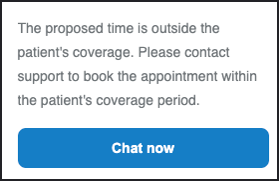
This screen includes:
| # | Element | Description |
|---|---|---|
| 1 | Coverage message | States that the proposed time falls outside the patient’s coverage |
| 2 | Chat now action | Opens Air Doctor support |
Workflow
- Select an appointment time in a supported appointment workflow.
- Validate the proposed time against the patient’s coverage period.
- Detect that the proposed time falls outside the coverage period.
- Call
PUT /api/v3/profile/appointments/{appointment-id}/outside-patient-coverage. - Display Outside Patient Coverage.
- Select Chat now to contact Air Doctor support.
The screen can appear from these workflows:
Validations
| Scenario | App behavior | SDK output |
|---|---|---|
| Proposed time falls outside the coverage period | Display the coverage screen | Page object |
| Proposed time falls within the coverage period | Continue the parent workflow | No coverage page |
Request returns 200 | Render the returned page | Page object |
Request returns 405 | Display an application error | Error response |
| Session is invalid | Reject the request | Authentication error |
Actions
| Scenario | App behavior | SDK output |
|---|---|---|
| Chat now selected | Open Air Doctor support | Navigation event |
Endpoint Resources
Approve Note
PUT
v3/appointments/{appointment-id}/outside-patient-coverage
Displays the Outside Patient Coverage page when the proposed appointment time falls outside the patient’s coverage period.
Path Parameters
| Parameter | Type | Required | Description |
|---|---|---|---|
appointment-id | Integer | Yes | Identifies the appointment |
UI Element Types
| Level | Reference | Type | Value | Placement |
|---|---|---|---|---|
| 1 | outside-patient-coverage | Regular | The proposed time is outside the patient's coverage. Contact support to book the appointment within the coverage period. | — |
| 1 | chat-now | Button | Chat now | — |