Visit Took Place
Use the Visit Took Place screen to complete appointments after a doctor finishes a visit.
This screen opens from Appointment Details and presents a wizard for visit notes, charges, and documents.
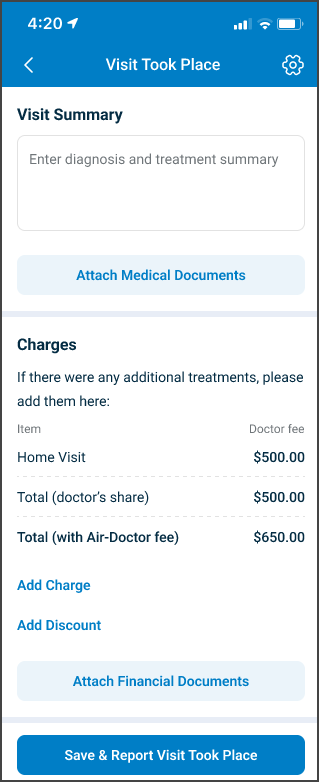
This screen includes:
- Inndicator: Visit Summary, Charges, Documents.
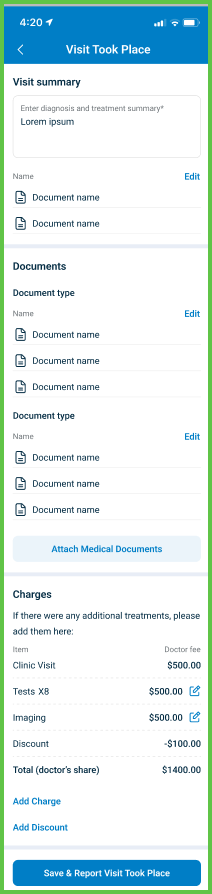
- A memo field for diagnosis and treatment notes.
- An optional control for a visit summary file.
- A Continue button that becomes available after required fields meet validation rules.
- Fields for additional charges and one discount per visit.
- A document section with type selection, notes, and file controls.
- Step controls that move between Visit Summary, Charges, and Documents
Workflow
- In Appointment Details, select Visit took place.
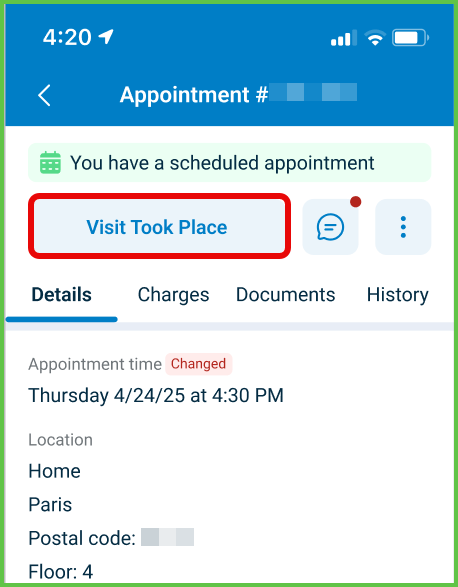
- Review the prefilled patient and appointment details.
- In Visit Summary, enter diagnosis and treatment notes.

- Optionally, attach a visit summary document.
See Document Details. - In Charges, enter additional fees or one discount, according to fee rules.
- In Documents, attach medical files with valid types and notes.
- Select Save & Report Visit Took Place to complete the visit.
Validations
These scenarios describe how the app validates the Visit Took Place wizard.
| Scenario | App Behavior | SDK Output | Example |
|---|---|---|---|
| The doctor attempts to continue from Visit Summary without diagnosis and treatment notes. | The app disables Continue and marks the summary field as required. | Validation error for missing summary content. | |
| The doctor enters a negative value in a charge field. | The app rejects the value and marks the field with an error message. | Validation error for invalid amount. | — |
| The doctor enters a discount that exceeds or equals the doctor net fee. | The app blocks the discount and displays a message that explains the allowed range. | Error such as NEGATIVE_TOTAL or fee limit error, depending on configuration. | — |
| The doctor attempts to define more than one discount. | The app prevents additional discount entries and highlights the existing discount. | Validation error for discount duplication. | — |
| A document entry lacks a name or valid type before file attachment. | The app marks the document row as incomplete and blocks submission. | Validation error and partial document row in the update set. | — |
| The wizard detects incomplete required fields on any step. | The app blocks step transitions until fields meet validation rules. | Validation error set that targets the affected fields. | — |
Actions
These scenarios describe how the app responds to doctor actions on the Visit Took Place screen.
| Scenario | App Behavior | SDK Output | Example |
|---|---|---|---|
| The doctor selects Continue on a valid step. | The app moves to the next step and keeps existing data for the visit. | Update set that changes the current step in the page object. | |
| The doctor selects Save & Report Visit Took Place. | The app completes the visit, sets the appointment to a completed state, and returns control to Appointment Details or the appointment workspace. | Update set that records visit notes, charges, discounts, documents, and status. | — |
| The doctor attaches a medical document with a valid type and note. | The app displays the new document row in the Documents section. | Update set that adds a document block to the page. | 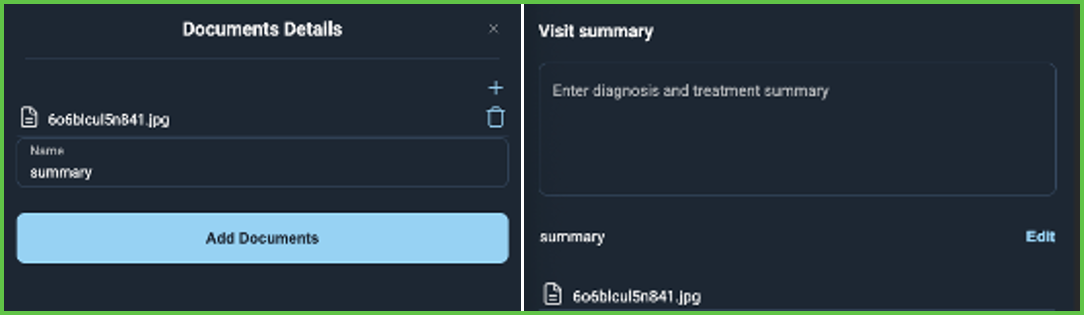 |
| The doctor edits or removes a previously attached document. | The app updates or removes the document row without a full reload. | Update set that reflects the new document state. | 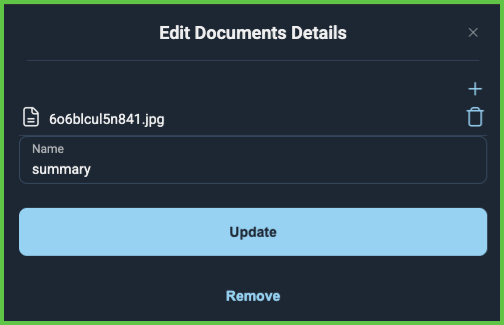 |
| The doctor edits charges or discount values. | The app recalculates total fee and updates the Total (doctor’s share) field. | Update set that updates charge rows and the total fee field. | — |
| The doctor navigates back to a previous step. | The app keeps data from all steps and displays the requested step. | Page object with the same data and updated active step. | — |
Endpoint Resources
Visit Summary Screen
PUT
/appointments/{appointment-id}/summary
Produces the Visit Took Place wizard for the specified appointment
UI Element Types
| Level | Reference | Type | Value | Placement |
|---|---|---|---|---|
| 1 | summary-header | Section | Visit summary | |
| 1 | internal-note | Memo | Enter diagnosis and treatment summary | 🗨 1 |
| 1 | summary-group~0 | Group | 🗨 1 | |
| 2 | summary-field-name~0 | Regular | ||
| 2 | summary-name-spacer~0 | Spacer | ~ | |
| 2 | summary-edit-button~0 | Link | Edit | ~ |
| 2 | summary-files~0 | Upload | ||
| 2 | summary-notes~0 | Edit | 🗨 1 | |
| 1 | summary-target | Regular | 🗨 1 | |
| 1 | attach-summary-text | Regular | Or upload visit summary: | |
| 1 | upload-visit-summary | Secondary | Upload Visit Summary | |
| 1 | bar | Bar | ||
| 1 | charges-header | Section | Charges | 🗨 1 |
| 1 | charges-info | Regular | If there were any additional treatments, please add them here: | |
| 1 | header-item | Extra | Item | |
| 1 | header-spacer | Spacer | ~ | |
| 1 | header-amount | Extra | Doctor fee | ~ |
| 1 | visit-type | Regular | visit type name | 🗨 1 |
| 1 | visit-spacer | Spacer | ~ | |
| 1 | visit-fee | Highlight | appointment net fee with currency | ~ |
| 1 | dashes | Dashes | ||
| 1 | charge-group~0 | Group | ||
| 2 | extra-title~0 | Regular | extra charge's notes | |
| 2 | extra-spacer~0 | Spacer | 🗨 1 | |
| 2 | extra-amount~0 | Highlight | quantity * price in appointment’s currency | ~ |
| 2 | extra-edit~0 | Link | Edit | ~ |
| 2 | charge-info~0 | Edit | extra charge's notes | 🗨 1 |
| 2 | charge-quantity~0 | Integer | extra charge's quantity | 🗨 1 |
| 2 | charge-price~0 | Double | extra charge's amount | 🗨 1 |
| 2 | dashes~0 | Dashes | ||
| 1 | extra-target | Regular | 🗨 1 | |
| 1 | discount-group | Group | 🗨 1 | |
| 2 | extra-title~d | Regular | discount’s notes | 🗨 1 |
| 2 | extra-spacer~d | Spacer | ~ | |
| 2 | extra-amount~d | Highlight | discount price in appointment's currency | 🗨 1 |
| 2 | extra-edit~d | Link | Edit | ~ |
| 2 | discount-type~d | Edit | the DiscountType in json representation | 🗨 1 |
| 2 | discount-amount~d | Double | the relative value of amount or percentage | 🗨 1 |
| 2 | dashes | Dashes | ||
| 1 | discount-target | Regular | 🗨 1 | |
| 1 | total-fee-title | Highlight | Total (doctor’s share) | |
| 1 | total-fee-spacer | Spacer | ~ | |
| 1 | total-fee | Highlight | total fee = appointment fee net + all charges - discount | ~ |
| 1 | add-charge | Ghost | Add charge | 🗨 1 |
| 1 | add-discount | Ghost | Add discount | 🗨 1 |
| 1 | bar | Bar | ||
| 1 | document-header | Section | Documents | |
| 1 | document-group~0 | Group | ||
| 2 | document-type-title~0 | Highlight | the MedicalDocumentType translations (represents ExpenseTypeEnum) | 🗨 1 |
| 2 | document-file-name~0 | Extra | document’s notes | |
| 2 | document-name-spacer~0 | Spacer | ~ | |
| 2 | document-edit-button~0 | Link | Edit | ~ |
| 2 | document-files~0 | Upload | ||
| 2 | document-type~0 | Edit | the MedicalDocumentType in json representation | 🗨 1 |
| 2 | document-notes~0 | Edit | document’s notes | 🗨 1 |
| 1 | document-target | Regular | 🗨 1 | |
| 1 | attach-medical-document | Secondary | Attach Documents | |
| 1 | bar | Bar | ||
| 1 | save | Button | Save & Report visit took place |
Present Visit Summary Popup
PUT
/profile/appointments/{appointment-id}/summary/summaries
Presents the visit summary popup for the selected appointment in new or edit mode.
Save Visit Summary
POSt
/profile/appointments/{appointment-id}/summary/summaries
Saves the complete visit summary for the appointment. This operation records physician notes, charges, discounts, and medical documents. The endpoint enforces validation rules and business constraints. A successful request returns 204 No Content.