Cancel
Use the Cancel Appointment screen to stop an appointment request.
The Doctor App presents this screen when inactivity triggers expiration or when the doctor initiates cancellation from Appointment Details.
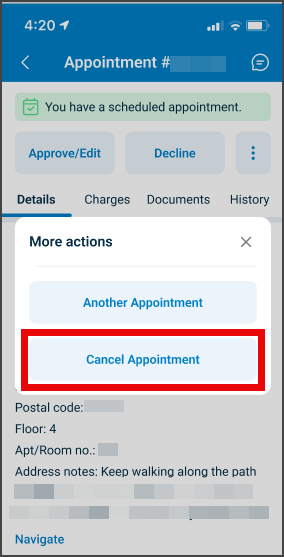
This screen includes:
- Automatic expiration logic based on inactivity.
- A structured cancellation form with predefined reasons.
- A conditional Other reason that activates a text box.
- A confirmation banner after cancellation.
- A read-only appointment interface after status change.
Workflow
Automatic Expiration
- The app opens a new appointment request.
- If no action occurs, the expiration timer starts.
- After the configured timeout, the appointment state changes to
expired.
Manual Cancellation
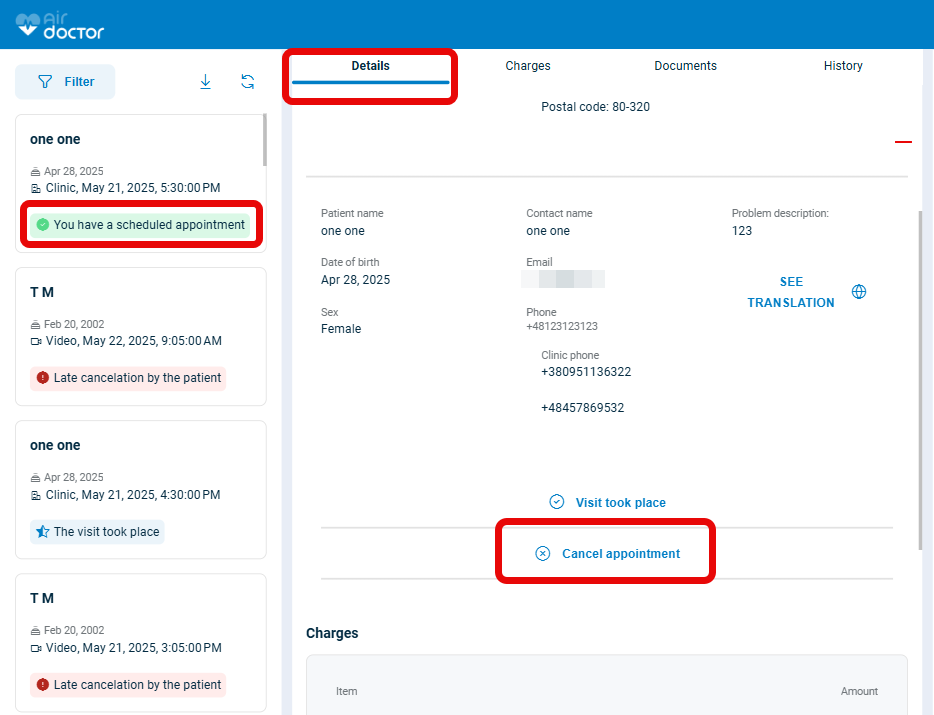
- Navigate to the Appointment Details screen.
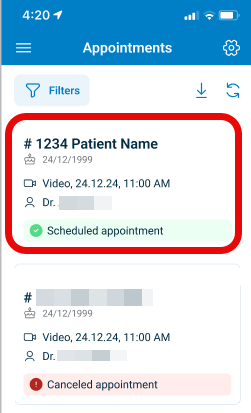
- Select Cancel Appointment.
- The app presents the question:
Why do you want to cancel the appointment? - Select one of the available reasons:
- I had an emergency
- I was not aware of the appointment
- I mistakenly approved
- Other (please specify)
- If Other is selected, enter a short explanation.
- Select Cancel Appointment to confirm.
- The app displays a confirmation banner and locks the appointment interface.
After Cancellation
- The app updates the status to
expiredorcanceled. - All appointment interactions become disabled.
- A persistent badge displays the new status.
- The doctor is redirected to the Appointment Details screen.
Validations
These scenarios describe how the app validates the Cancel Appointment screen and what the integrator can expect.
| Scenario | App Behavior | SDK Output | Example |
|---|---|---|---|
| The doctor selects Cancel Appointment without choosing a reason. | The app disables submission and highlights the required field. | Validation error for missing reason. | — |
| The doctor selects Other but enters no comment. | The app disables submission and highlights the text box. | Validation error for missing comment. | — |
| The cancellation action occurs after expiration logic activates. | The app locks actions and displays an expired state. | Page object with disabled action controls. | |
| Inactivity triggers timeout. | The app sets the appointment state to expired and presents read-only content. | Update set that applies the expired state. | — |
| The cancellation workflow detects inconsistent or missing data. | The app presents an error section. | Error code identifying invalid data. | — |
Actions
These scenarios describe how the app responds to actions on the Cancel Appointment screen and what the SDK returns.
| Scenario | App Behavior | SDK Output | Example |
|---|---|---|---|
| The doctor selects Cancel Appointment with a valid reason. | The app applies the cancellation state and displays a confirmation banner. | Update set that applies status canceled and logs the reason. | |
| The doctor selects Other and enters a comment. | The app accepts the comment and enables the confirmation button. | Update set with the comment field and reason identifier. | — |
| Automatic expiration triggers. | The app sets the appointment to read-only and updates the status to expired. | Update set that includes state expired. | — |
| The doctor returns from the cancellation popup. | The app restores the previous UI without confirming cancellation. | No-op update set. | — |
| The cancellation request conflicts with an updated appointment state. | The app requests a reload before accepting the action. | Error such as APPOINTMENT_CHANGED. | — |
Endpoint Resources
Cancel Appointment Screen
PUT
/profile/appointments/{appointment-id}/cancel
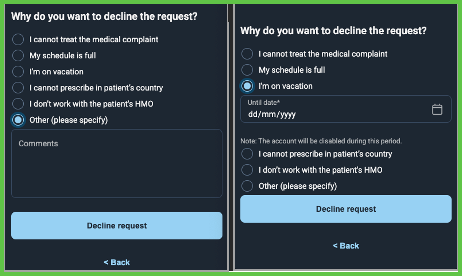
Produces the cancellation popup and presents valid cancellation options.
UI Element Types
| Level | Reference | Type | Value | Placement |
|---|---|---|---|---|
| 1 | title | Title | Why do you want to decline the request? | — |
| 1 | reason~{enum-name} | Radio | I cannot treat this medical complaint | — |
| 1 | reason~{enum-name} | Radio | My schedule is full | — |
| 1 | reason~{enum-name} | Radio | I'm on vacation | — |
| 1 | date | Date | Until date | — |
| 1 | note | Extra | Note: The account will be disabled during this period. | — |
| 1 | reason~{enum-name} | Radio | I cannot prescribe in patient's country | — |
| 1 | reason~{enum-name} | Radio | Other (please specify) | — |
| 1 | comments | Edit | Reason | — |
| 1 | cancel | Button | Decline Request | — |
| 1 | back | Ghost | Back | — |
Update Reason
PATCH
profile/appointments/{appointment-id}/cancel/change-reason
Updates the selected cancellation reason and refreshes the popup state.
Submit Cancellation
POST
/profile/appointments/{appointment-id}/cancel
Confirms the selected reason and applies the cancellation state.
Endpoint Summary
| Endpoint | Method | Action Type | Function |
|---|---|---|---|
/profile/appointments/{id}/cancel | PUT | Present | Show cancellation popup |
/profile/appointments/{id}/cancel/change-reason | PATCH | Modify | Update selected reason |
/profile/appointments/{id}/cancel | POST | Apply | Submit cancellatio |