Sign in Screen
Use Sign in Screen to let anonymous users sign in with email and password or a supported social provider.
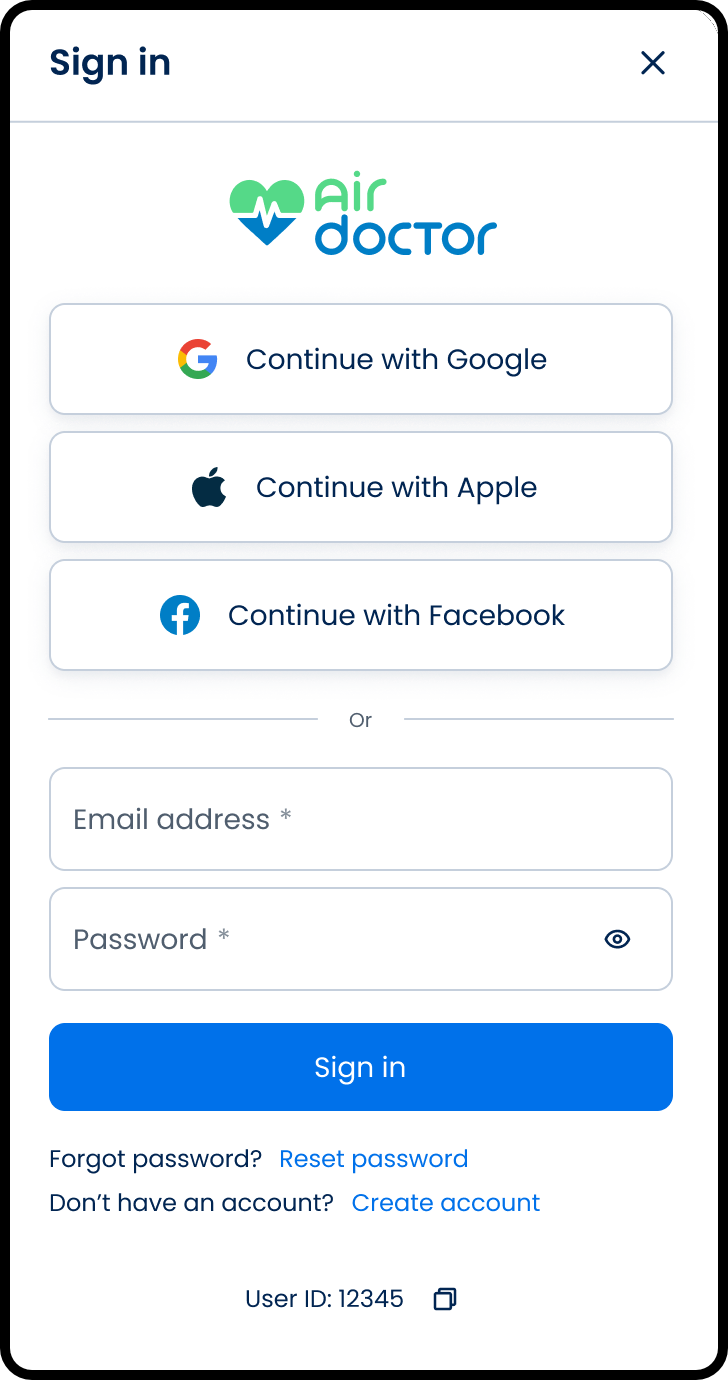
This screen includes:
| # | Element | Description |
|---|---|---|
| 1 | Header | Displays Sign in title and close control |
| 2 | Branding | Displays Air Doctor logo |
| 3 | Social sign-in options | Provides Google, Apple, and Facebook authentication |
| 4 | Email field | Required input for account email |
| 5 | Password field | Required input with visibility toggle |
| 6 | Sign in button | Submits credentials |
| 7 | Forgot password link | Opens the reset password flow |
| 8 | Create account link | Opens account registration |
| 9 | User ID label | Displays user identifier with copy action |
Workflow
- Open the Sign in screen.
- Select a social sign-in option, or enter email and password.
- Select Sign in.
- Continue to the requested screen after successful authentication.
Validations
| Scenario | App behavior | SDK output |
|---|---|---|
| Email missing | Block sign-in | validation = email_required |
| Email invalid | Display email validation state | validation = invalid_email |
| Password missing | Block sign-in | validation = password_required |
| Credentials invalid | Display sign-in error | error = invalid_credentials |
| MFA required | Display MFA verification modal | mfa = required |
| Sign-in succeeds | Authenticate user | state = authenticated |
| Request rejected | Display error state | status = 405 |
Actions
| Scenario | App behavior | SDK output |
|---|---|---|
| Sign-in screen opens | Load sign-in screen | PUT /api/v3/sign-in |
| Email updated | Update email input state | email = updated |
| Password updated | Update password input state | password = updated |
| Password visibility selected | Toggle password visibility | passwordVisible = true/false |
| Sign in selected | Submit email and password | POST /api/v3/sign-in |
| Social sign-in selected | Submit social identity token | POST /api/v3/sign-in/social |
| Reset password selected | Open reset password flow | navigation = reset_password |
| Create account selected | Open registration flow | navigation = create_account |
| User ID copy selected | Copy user ID | userId = copied |
| Close selected | Close the modal | state = dismissed |
Endpoint Resources
Sign In Screen
PUT
v3/account/sign-in
Returns the sign-in screen for anonymous users.
Query Parameters
| Name | Type | Required | Description |
|---|---|---|---|
screen-mode | string | Yes | Controls which sign-in experience to render. |
Sign In
POST
v3/account/sign-in
Authenticates the user with email and password.
Query Parameters
| Name | Type | Required | Description |
|---|---|---|---|
screen-mode | string | Yes | Controls which sign-in experience to render. |
email | string | Yes | Account email address. |
password | string | Yes | Account password. |
Social Sign In
POST
v3/account/sign-in/social
Authenticates the user with a social identity token.
Query Parameters
| Name | Type | Required | Description |
|---|---|---|---|
screen-mode | string | Yes | Controls which sign-in experience to render. |
token | string | Yes | Firebase identity token from the social provider. |