Main Start Screen
Use Main Start Screen to display the first home state when the user has not selected a location.
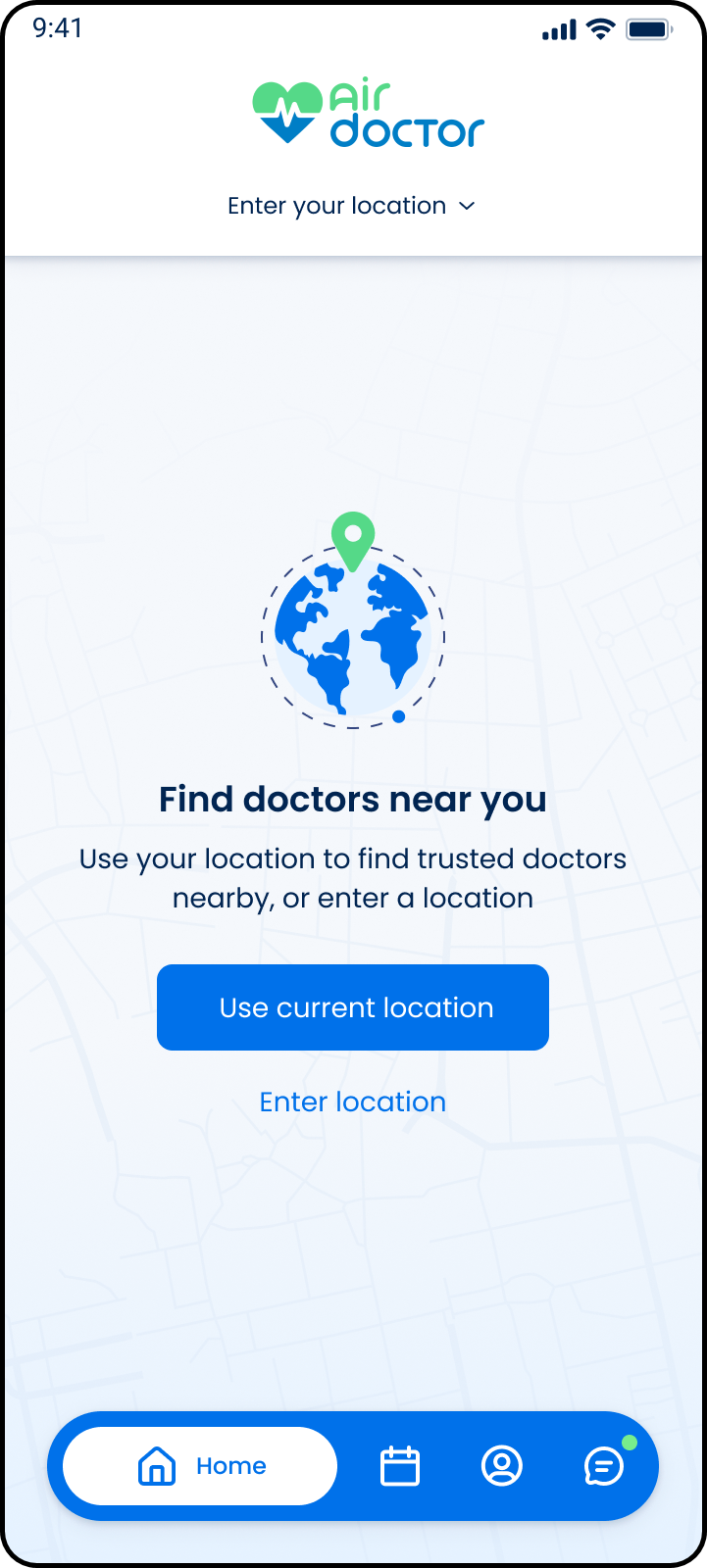
This screen includes:
| # | Element | Description |
|---|---|---|
| 1 | Header logo | Displays the Air Doctor logo. |
| 2 | Location selector | Displays Enter your location and opens location entry. |
| 3 | Map background | Shows a location-based visual background. |
| 4 | Location illustration | Displays the globe and location pin graphic. |
| 5 | Screen title | Displays Find doctors near you. |
| 6 | Instruction text | Explains that location is used to find trusted doctors nearby. |
| 7 | Use current location action | Requests device location access. |
| 8 | Enter location action | Opens manual location entry. |
| 9 | Bottom navigation | Provides access to Home, Appointments, Profile, and Messages. |
| 10 | Active navigation item | Highlights Home as the current tab. |
Workflow
- Open the app start screen.
- Check whether a location is already selected.
- Display the location prompt when no location is available.
- Select Use current location to request device location access.
- Select Enter location to open manual location entry.
- Save the selected or detected location.
- Load available doctors for the selected location.
Validations
| Scenario | App behavior | SDK output |
|---|---|---|
| Session invalid | Display start screen without user-specific data | state = guest |
| Location missing | Display location prompt | location = required |
| Location permission granted | Use device location | locationSource = current_location |
| Location permission denied | Keep manual location entry available | locationPermission = denied |
| Manual location selected | Save selected location | locationSource = manual |
| Location lookup fails | Display fallback state | state = error |
| Request rejected | Display error state | status = 405 |
Actions
| Scenario | App behavior | SDK output |
|---|---|---|
| Start screen opens | Load start screen | PUT /api/v3/start |
| Location selector selected | Open manual location entry | action = enter_location |
| Use current location selected | Request device location permission | action = use_current_location |
| Location selected | Save location and refresh available doctors | location = selected |
| Home selected | Keep user on start screen | navigation = home |
| Appointments selected | Open appointments area | navigation = appointments |
| Profile selected | Open profile area | navigation = profile |
| Messages selected | Open messages area | navigation = messages |
Endpoint Resources
Main Start Screen
PUT
v3/start
Returns the start screen or routes the user to the correct home page.