Sign up
Use the Create an account screen to sign up a new user account and start an authenticated session. signup.screen
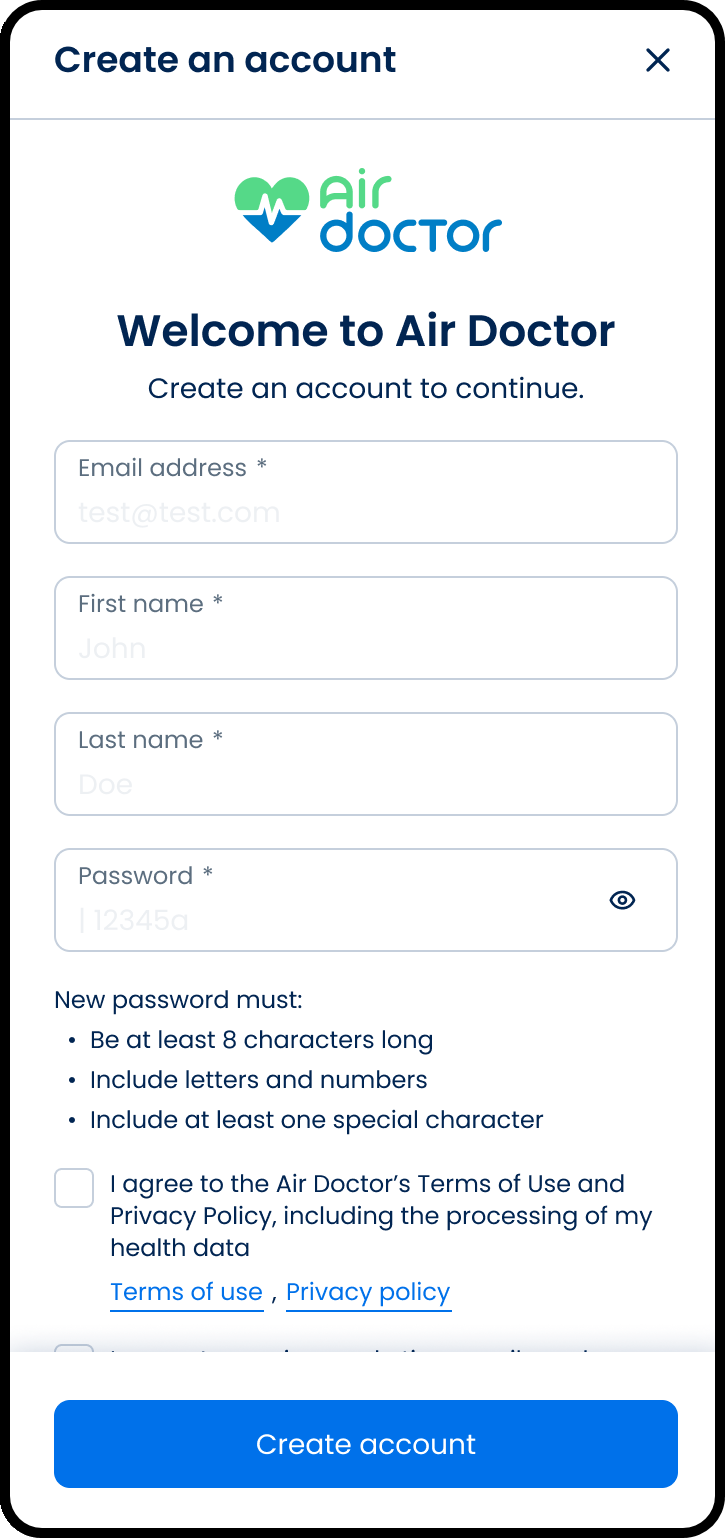
This screen includes:
| # | Element | Description |
|---|---|---|
| 1 | Email address field | Required email address for the new account |
| 2 | First name field | Required given name |
| 3 | Last name field | Required family name |
| 4 | Password field | Required password that must meet policy rules |
| 5 | Terms and Privacy consent | Required consent before account creation |
| 6 | Marketing opt-in | Optional marketing communication preference |
| 7 | Continue with email button | Submits the registration form |
| 8 | Sign in link | Opens the Sign in screen for existing users |
Workflow
- Open the Create an account screen.
- Enter the required account details.
- Select the Terms and Privacy consent checkbox.
- Select Continue with email.
- Create the account and start an authenticated session.
Validations
| Scenario | App Behavior | SDK Output |
|---|---|---|
| Email format invalid | Block submission and display field error | error = invalid_email |
| Email already exists | Reject registration and prompt sign in | error = existing_account |
| First or last name missing | Block submission and display field error | validation = required |
| Password invalid | Block submission and display password rule error | error = password_policy |
| Required consent not selected | Block submission | validation = consent_required |
| Request in progress | Show loading state | state = loading |
| Request blocked | Display restriction message | HTTP 405 |
Actions
| Scenario | App Behavior | SDK Output |
|---|---|---|
| Email entered | Update email state | email = updated |
| Submit email | Validate email and advance registration | Page updates returned |
| Account details entered | Update form state | Form state updated |
| Consent selected | Update consent state | termsConsent = true |
| Continue with email selected | Submit registration | Sign-up request triggered |
| Registration succeeds | Create session and continue | state = authenticated |
| Social sign-up selected | Start provider registration | Social sign-up event |
| Log in selected | Open Sign in screen | Navigation event |
Endpoint Resources
Signup Screen
PUT
v3/account/sign-up
Returns the sign-up screen for anonymous users.
Query Parameters
| Name | Type | Required | Description |
|---|---|---|---|
screen-mode | String | Yes | Controls which sign-up experience to render. |
| Value | Description |
|---|---|
signup | Successful signup flow |
regular | Regular booking screen flow |
wizard | Wizard booking screen flow |
direct-clinic | Direct clinic mode flow |
affiliate | Affiliate referral flow |
partner | Partner link flow |
Submit Email
PATCH
v3/account/sign-up/email
Validates the email and advances the sign-up flow to the full registration form.
Query Parameters
| Name | Type | Required | Description |
|---|---|---|---|
email | String | Yes | Email address for the new account. |
Signup
POST
v3/account/sign-up
Creates a new account with email and password and enforces required consents.
Query Parameters
| Name | Type | Required | Description |
|---|---|---|---|
screen-mode | String | Yes | Controls which sign-in experience to render. |
email | String | Yes | Email address for the new account. |
password | String | Yes | New account password. |
first-name | String | Yes | User's first name. |
last-name | String | Yes | User's last name. |
terms-and-privacy-consent | Boolean | Yes | Must be true to accept Terms of Use, Privacy Policy, and health data processing. |
marketing-email-consent | Boolean | No | Optional opt-in to receive marketing emails and special offers. |
| Value | Description |
|---|---|
signup | Successful signup flow |
regular | Regular booking screen flow |
wizard | Wizard booking screen flow |
direct-clinic | Direct clinic mode flow |
affiliate | Affiliate referral flow |
partner | Partner link flow |
Social Signup
POST
v3/account/sign-up/social
Creates a new account using a social identity token.
Query Parameters
| Name | Type | Required | Description |
|---|---|---|---|
screen-mode | String | Yes | Controls which sign-in experience to render. |
token | String | Yes | Firebase identity token from the social provider used to create the account. |
| Value | Description |
|---|---|
signup | Successful signup flow |
regular | Regular booking screen flow |
wizard | Wizard booking screen flow |
direct-clinic | Direct clinic mode flow |
affiliate | Affiliate referral flow |
partner | Partner link flow |