Services
Use Services to open claim-related actions and available service flows.
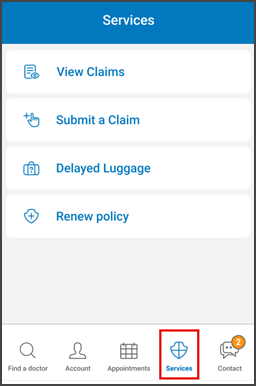
This screen includes:
| # | Element | Description |
|---|---|---|
| 1 | Page title | Displays Services. |
| 2 | View claims action | Opens the claims list. |
| 3 | Claim count badge | Displays the number of available claims when applicable. |
| 4 | Submit a claim action | Opens the claim submission flow. |
| 5 | Delayed luggage action | Opens the delayed luggage service flow. |
| 6 | List item layout | Displays each service with an icon, label, and navigation indicator. |
| 7 | Section divider | Separates claim actions from additional services. |
| 8 | Bottom navigation | Highlights Services as the active tab. |
Workflow
- Open Services from bottom navigation.
- Display available service options.
- Select a service.
- Open the selected destination or external flow.
Validations
| Scenario | App behavior | SDK output |
|---|---|---|
| Services available | Display service list | services = available |
| Claims available | Display claim count badge | claims = available |
| Claims unavailable | Hide claim count badge | claims = unavailable |
| Service unavailable | Hide or disable service action | service = unavailable |
| External flow unavailable | Use device fallback behavior | externalFlow = unavailable |
| Request rejected | Display error state | status = 405 |
Actions
| Scenario | App behavior | SDK output |
|---|---|---|
| Services screen opens | Load services screen | PUT /api/v3/services |
| View claims selected | Open claims list | navigation = claims |
| Submit a claim selected | Open claim submission flow | navigation = submit_claim |
| Delayed luggage selected | Open delayed luggage flow | navigation = delayed_luggage |
| Renew policy selected | Submit renew policy action | PATCH /api/v3/services/renew-policy |
| Bottom navigation selected | Open selected app area | navigation = selected |
Endpoint Resources
Service
PUT
v3/insurers/services
Returns the available services screen.
Process Renew Policy
PATCH
v3/insurers/services/renew-policy
Renews the user’s insurance policy.