Version Update
Use Version Update when a newer version of the Air Doctor app is available and the user must update the app.
The screen explains that a newer version contains the latest improvements and features and provides an Update action.
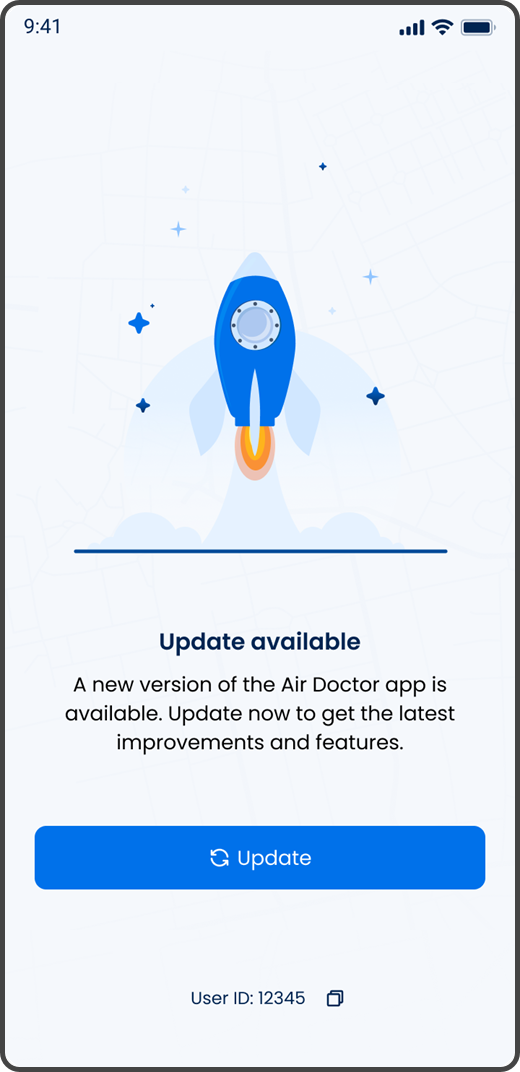
This screen includes:
| # | Element | Description |
|---|---|---|
| 1 | Update illustration | Indicates that a new app version is available |
| 2 | Update message | States that a newer version of the Air Doctor app is available |
| 3 | Update guidance | Explains that the new version includes the latest improvements and features |
| 4 | Update action | Opens the app update flow |
| 5 | User ID | Displays the user identifier for support reference |
| 6 | Copy action | Copies the user ID |
Workflow
- Detect that a newer app version is required.
- Display the Version Update screen.
- Inform the user that a newer version is available.
- Select Update.
- Open the applicable app update flow.
- Install the current supported app version.
- Open the Air Doctor app again.
Validations
| Scenario | App behavior | SDK output |
|---|---|---|
| New app version is required | Display the Version Update screen | Version update screen |
| Update action is available | Display Update | Update action available |
| User ID is available | Display the user ID and copy action | User identifier |
Actions
| Scenario | App behavior | SDK output |
|---|---|---|
| Update selected | Open the app update flow | External update action |
| Copy selected | Copy the displayed user ID | Clipboard action |