Location Permissions
Use Location Permissions to request location access when the app needs the user location to show nearby doctors and relevant care options.
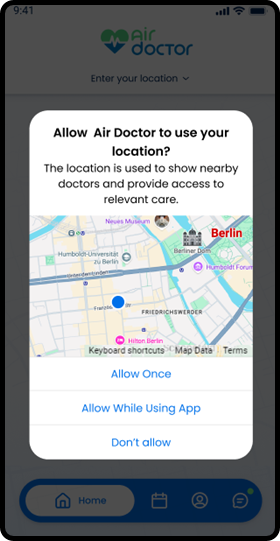
This screen includes:
| # | Element | Description |
|---|---|---|
| 1 | Permission modal | Requests access to the user location. |
| 2 | Permission title | Displays Allow Air Doctor to use your location? |
| 3 | Permission message | Explains that location access helps show nearby doctors and relevant care. |
| 4 | Map preview | Shows the approximate location area on a map. |
| 5 | Allow once action | Grants temporary location access for the current session. |
| 6 | Allow while using app action | Grants location access while the app is in use. |
| 7 | Deny action | Blocks location access and closes the permission request. |
Workflow
- Open a flow that requires location access.
- Display the location permission modal when access is unavailable.
- Select Allow Once, Allow While Using App, or Don’t allow.
- Submit the permission result.
- Continue the current flow when location access is available.
- Display a fallback state when location access remains unavailable.
Validations
| Scenario | App Behavior | SDK Output |
|---|---|---|
| Session invalid | Block permission update | state = unauthenticated |
| Location access available | Continue the current flow | locationPermission = granted |
| Location access denied | Display the location permission modal | locationPermission = denied |
| Location access unavailable | Display the location permission modal | locationPermission = unavailable |
| Permission result accepted | Continue with location-based results | state = updated |
| Permission result rejected | Preserve the current flow state | state = unchanged |
| Permission update fails | Display error state | state = error |
Actions
| Scenario | App Behavior | SDK Output |
|---|---|---|
| Location permission required | Request location permission content | PUT /api/v3/location-permission |
| Allow Once selected | Submit temporary permission access | permission = allow_once |
| Allow While Using App selected | Submit app-use permission access | permission = allow_while_using_app |
| Don’t allow selected | Submit denied permission access | permission = denied |
| Permission result changed | Process permission result | PATCH /api/v3/location-permission/update |
| Update succeeds | Continue the correct flow for the current context | state = updated |
| Update rejected | Preserve the current state | state = unchanged |
Endpoint Resources
PUT
Location Permissions
v3/location-permission
Displays a location permission popup when location access is denied and requests the required permission to continue.
Permission Request
PATCH
v3/location-permission/update
Processes the location permission result and continues the correct flow based on context.