Partner Greeting Popup
Use the Partner Greeting screen to display a company-specific welcome message when the user opens the service from a partner link.
The screen appears for the company identified by company-id. The response returns a popup or page that the client displays before the user continues.
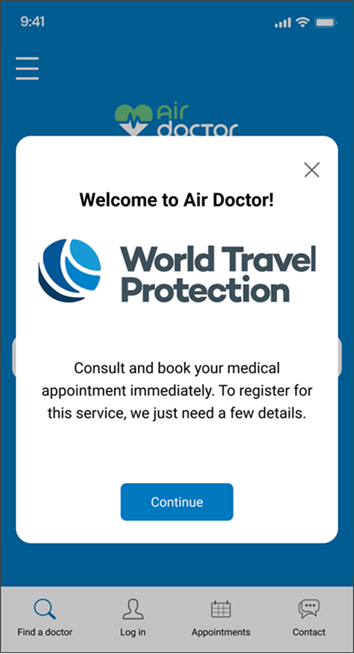
This screen includes:
| # | Element | Description |
|---|---|---|
| 1 | Greeting popup | Displays the partner-specific greeting above the current screen |
| 2 | Title | Displays Welcome to Air Doctor! |
| 3 | Partner branding | Displays the partner logo and brand name |
| 4 | Message text | Explains the partner-specific onboarding or continuation step |
| 5 | Primary action | Continues the flow, such as Continue or Get mobile app |
| 6 | Secondary action | Provides an alternate path, such as Stay in browser, when available |
| 7 | Close action | Dismisses the greeting when available |
Workflow
- Open the service from a partner link.
- Load the greeting for the provided
company-id. - Display the partner-specific greeting popup.
- Select the primary action or an available secondary action.
- Continue in the selected flow.
Validations
| Scenario | App Behavior | SDK Output |
|---|---|---|
company-id missing | Do not load the greeting | validation = required |
| Greeting content available | Display greeting popup or page | Page response |
| Primary action unavailable | Keep action disabled | button = disabled |
| Primary action available | Enable action | button = enabled |
| Request blocked | Display restriction message | HTTP 405 |
Actions
| Scenario | App Behavior | SDK Output |
|---|---|---|
| Screen opened | Load partner greeting | PUT /api/v3/greetings?company-id=<id> |
| Checkbox updated, when present | Update primary action state | Page updates returned |
| Continue selected | Continue onboarding or registration | Navigation or page update |
| Get mobile app selected | Open native app path or app acquisition flow | Navigation event |
| Stay in browser selected | Continue in web flow | Navigation or page update |
| Close selected | Dismiss greeting | No state change or page update |
Endpoint Resources
Greetings
PUT
v3/greetings
Returns the greeting popup or page for the provided company.
| Parameter | Type | Required | Description |
|---|---|---|---|
company-id | integer | Yes | Insurance company identifier for the greeting |
Update Button
PATCH
v3/greetings
Updates the primary button state when the checkbox state changes.
| Parameter | Type | Required | Description |
|---|---|---|---|
checkbox | boolean | Yes | Checkbox value. Use true when checked and false when unchecked |