App Maintenance
Use App Maintenance when Air Doctor is temporarily unavailable due to scheduled maintenance.
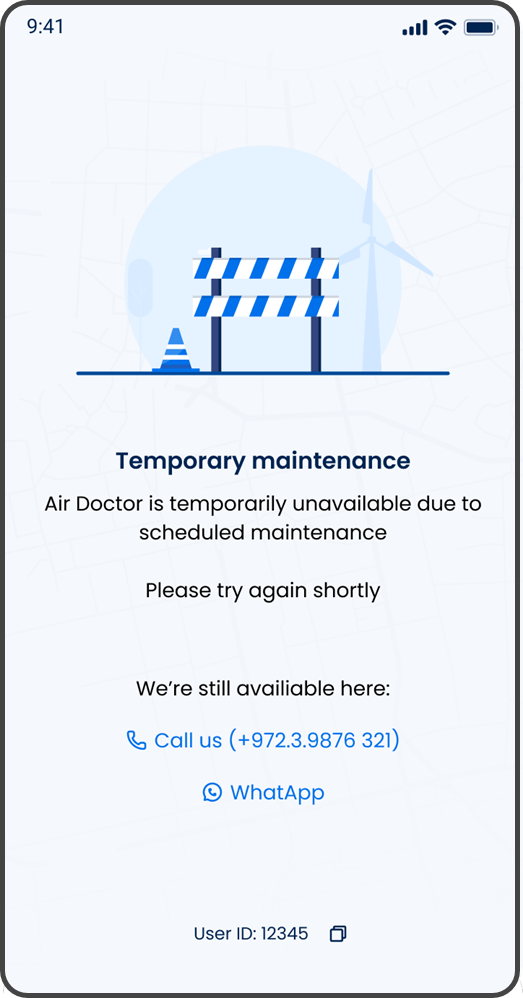
This screen includes:
| # | Element | Description |
|---|---|---|
| 1 | Maintenance illustration | Indicates that the service is temporarily unavailable |
| 2 | Maintenance message | States that Air Doctor is temporarily unavailable due to scheduled maintenance |
| 3 | Retry guidance | Advises the user to try again shortly |
| 4 | Call us action | Opens the device call action for the displayed support number |
| 5 | WhatsApp action | Opens WhatsApp support |
| 6 | User ID | Displays the user identifier for support reference |
| 7 | Copy action | Copies the user ID |
Workflow
- Display App Maintenance while the Air Doctor service is unavailable for scheduled maintenance.
- Inform the user that normal app access is temporarily unavailable.
- Provide the support phone number and WhatsApp option.
- Allow the user to contact support when assistance is required.
- Allow the user to copy the displayed user ID for support reference.
- Advise the user to try the app again shortly.
Validations
| Scenario | App behavior | SDK output |
|---|---|---|
| Scheduled maintenance is active | Display the App Maintenance screen | Maintenance screen |
| Normal app functions are unavailable | Keep the user on the maintenance screen | Maintenance state |
| Support phone number is available | Display Call us | Device call action available |
| WhatsApp support is available | Display WhatsApp | External support action available |
| User ID is available | Display the user ID and copy action | User identifier |
Actions
| Scenario | App behavior | SDK output |
|---|---|---|
| Call us selected | Open the device call action with the displayed support number | External call action |
| WhatsApp selected | Open WhatsApp support | External app action |
| Copy selected | Copy the displayed user ID | Clipboard action |