Appointment Filter
Use the Filter screen to refine doctor results.
important
Available filters, sorting options, and sections derive from the selected visit type and filter configuration.
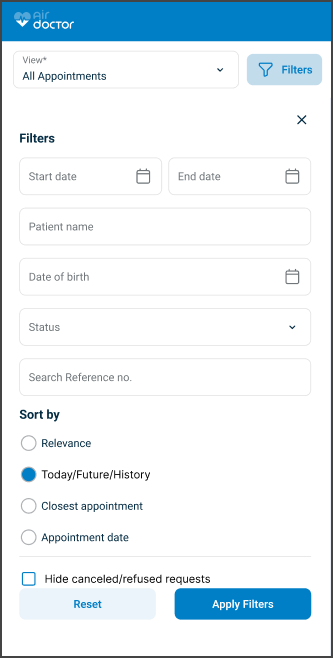
This screen includes:
| # | Element | Description |
|---|---|---|
| 1 | Visit type selector (Home/Clinic) | Filters by available visit types when applicable |
| 2 | Language selector | Filters by spoken language |
| 3 | Gender selector | Filters by doctor gender |
| 4 | Appointment date selector | Filters by appointment availability |
| 5 | Prescription filter (Video) | Filters doctors who can prescribe medication |
| 6 | Sort options | Sorts results by configured criteria |
Filter Variants
| Visit type | Supported filters |
|---|---|
| Clinic/Home | Visit type, language, gender, appointment date, distance, cost, experience |
| Video | Language, gender, appointment date, prescription support, relevance, cost |
Workflow
- Open Doctor List.
- Select Filter.
- Render filter configuration.
- Update one or more filter values.
- Apply filters.
- Refresh doctor results.
Validations
| Scenario | App Behavior | SDK Output |
|---|---|---|
| Date range invalid | Block submission | error = invalid_date_range |
| End date missing | Block submission | error = invalid_date_range |
| Patient date of birth invalid | Block submission | error = invalid_date_of_birth |
| No matching results | Display empty state | results = empty |
| Request in progress | Display loading state | state = loading |
| Request rejected | Display error state | status = 405 |
Actions
| Scenario | App Behavior | SDK Output |
|---|---|---|
| Filter opened | Load filter configuration | PUT /api/v3/appointments/filter |
| Filter value updated | Update filter state | filter = updated |
| Status group selected | Update status filter | statusGroup = updated |
| Location type selected | Update location filter | locationType = updated |
| Apply selected | Submit filter criteria | POST /api/v3/appointments/filter |
| Filters applied | Refresh results | results = filtered |
| Reset selected | Restore default filters | PATCH /api/v3/appointments/filter/reset |
| Cancel selected | Close without changes | state = unchanged |
| Close selected | Dismiss filter screen | navigation = dismissed |
Endpoint Resources
Filter
PUT
v3/appointments/filter
Returns the filter screen configuration.
Reset Filter
PATCH
v3/appointments/filter
Resets the filter screen to the default state.
Apply Filter
POST
v3/appointments/filter
Applies appointment filter criteria to the appointment list.
| Parameter | Type | Required | Description |
|---|---|---|---|
reference | string | No | Appointment reference or identifier to filter by |
start-date | date | No | Start date for appointment filtering |
end-date | date | No | End date for appointment filtering |
profile-id | integer | No | Doctor ID to filter by |
patient-name | string | No | Patient name for partial-match filtering |
patient-date-of-birth | date | No | Patient date of birth |
status-group | string[] | No | Appointment status groups |
location-type | string[] | No | Appointment location types |