Assistance Message
Use the Assistance Message modal to display contact details when an insurer provides two assistance companies.
The user opens the modal from the Get support drawer.
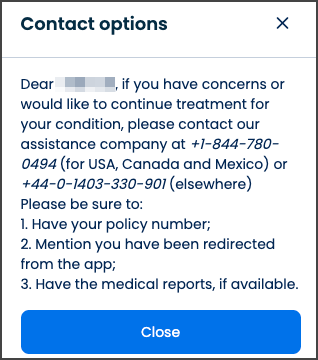
This screen includes:
| # | Element | Description |
|---|---|---|
| 1 | Support drawer | Displays support options |
| 2 | Show information action | Opens the assistance message |
| 3 | Modal title | Displays Contact options |
| 4 | Contact information | Displays assistance phone numbers |
| 5 | Preparation checklist | Lists required information |
| 6 | Close actions | Dismiss the drawer or modal |
Workflow
- Open the Get support drawer.
- Select Show information.
- Call
PUT /api/v3/insurers/{company-id}/assistance-message. - Display the Contact options modal.
- Review the contact information and preparation checklist.
- Select Close or the close icon.
Validations
| Scenario | App behavior | SDK output |
|---|---|---|
| Company ID is missing or invalid | Block the request | error = invalid_company_id |
| Assistance information is available | Display the modal | state = ready |
| Request fails | Display an error state | state = error |
| Session is invalid | Block access | state = unauthenticated |
Actions
| Scenario | App behavior | SDK output |
|---|---|---|
| Get support selected | Open the support drawer | Navigation event |
| Show information selected | Request assistance information | PUT request |
| Request succeeds | Display the Contact options modal | Page object |
| Close selected | Dismiss the modal | Navigation event |
| Drawer close selected | Dismiss the support drawer | Navigation event |
Endpoint Resources
Assistance Message
PUT
v3/insurers/{company-id}/assistance-message
Returns assistance contact information when the insurer provides two assistance companies.
| Parameter | Location | Type | Required | Description |
|---|---|---|---|---|
company-id | Path | Integer | Yes | Identifies the insurance company |